

Autoplay play feature is not only available in CD drives, but also on the flash drives and external hard drives that you connect to your PC. In any case your external drives or CDs are infected with virus or malwares, then chances are there that your PC could also be infected with the autoplay feature. Best way to combat this issue is to disable autoplay on all your system drives.
To disable autoplay on all drives, best method is to change it through Group Policy Editor. To do this click run and type gpedit.msc and press enter. Navigate to Local Computer Policy-> Computer Configuration->Administrative Templates-> System. Now on the right panel double click Turn off Autoplay. Now select enabled and choose All drives from the dropdown list and click ok.
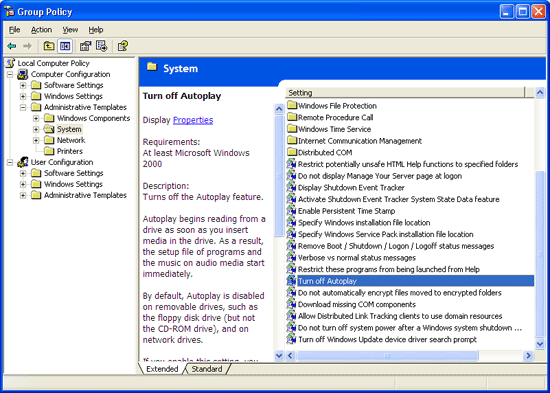
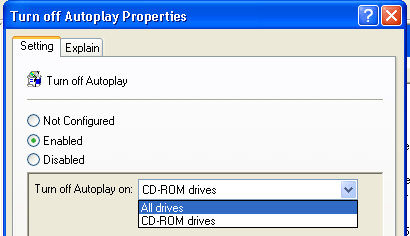
Now autoplay feature will be disabled on all drives which you connect to your PC.






Nice, tip. I use to pres and hold shift key to avoid autoplay when I plugin a drive.
@Smackall,
Thanks for that tip. There are many ways I guess.
Good one Nirmal, I was searching for this for a long time 🙂
One suggestion abt the website: Since you are using feedburner, can’t u activate the feedflare so that we can add post to delicious digg etc without leaving the feed reader?
Thanks
Anoop Engineer
@Anoop,
Glad that it was helpful for you.
I have activated Feedflare for my feeds. Now you can use them. 🙂 Thanks for the suggestion.
Nice tip, Nirmal 🙂
I have been using this for quite sometime now . The main source of virus in our college is USB drives.
Do all your readers have Win XP Professional?? I was surprised no one commented on their inability to find Group Policy Editor in their XP Home Edition. (GPE doesn’t come with XP Home Edition)
HI GUYS… I AM UNABLE OPEN GROUP POLICY EDITOR. IAM USING XP .PLZ SEND E TIP TO MY EMAIL ID.
[email protected]
thanks for the tips. This is very useful for my laptop.
TweakUI
Click My Computer
Autoplay
Drives
I only mark only the CD
Under types
Click Enable AutoPlay for CD and DVD drives
Jesus Christ! The “Autoplay Off” has to be ON the have Autoplay OFF. God Allmighty!
This is typically Windows. (Or Windoof, as we say in Germany.)
I type gpedit.msc and press enter and Navigate to Local Computer Policy-> Computer Configuration->Administrative Templates but i can not find system under it. what can i do?
My guess is that your PC does not belong to a domain. Not sure why that matters for this option.
how to turn off auto play in window xp home edition?
I was wondering the same thing, nasa! within two hours of your comment…
“Windows cannot find gpedit.msc. Make sure you typed the name correctly.”
Wonder why no one mentioned that this doesn’t work in home version since that includes most xp users. For Home version you need to go into registry. Here is the fix:
Click Start, click Run, type regedit in the Open box, and then click OK.
Locate and then click the following entry in the registry:
HKEY_CURRENT_USER\SOFTWARE\Microsoft\Windows\CurrentVersion\policies\Explorer\NoDriveTypeAutorun
Right-click NoDriveTypeAutoRun, and then click Modify.
In the Value data box, type 0xFF to disable all types of drives. Or, to selectively disable specific drives, use a different value as described in the “How to selectively disable specific Autorun features” section.
Click OK, and then exit Registry Editor.
Restart the computer.
This is something I found useful for an external drive
VERY EASY
How do I turn off Autoplay in Windows XP for my external hard drive?
?
In Windows XP a window will pop-up asking you “What do you want Windows to do?” when your external drive is detected.
This Window can be disabled by following these steps:
1. Open My Computer.
2. Right click on the drive letter assigned to your external drive.
3. Choose properties.
4. Click on the Autoplay tab.
5. Click the “Select an action to perform” option.
6. Choose “Take no action”.
7. Click the OK button.
Great thanks..
that was helpful… http://www.driven.pk