

The new Office 2007 has lots of features which are not available in previous versions of Office. Office 2007 also has few new formats like .xlsx, .xltx, .xltm, .docx etc. If you are sharing documents, then there are chances that some of the features may not be available if the other user is not having or using Office 2007.
Office 2007 provides an option to check whether the new features are compatible with the older version of Office. This is called compatibility checker.
In order to check compatibility, click on the Office button on the top left hand corner-> Prepare-> Run Compatibility checker.
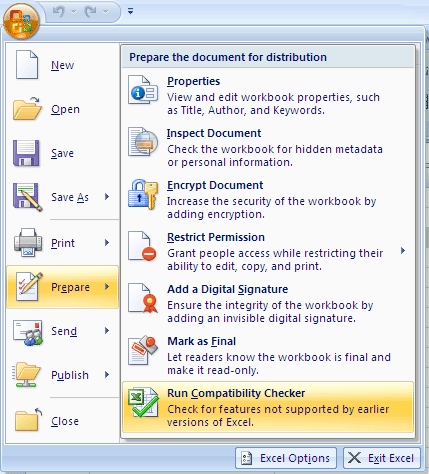
Once this is run, it will show features not supported in earlier versions.






Most of the features you would like to use, are not compatible with earlier versions 🙁 . specially smartart and the new shapes added 😉
thanks for the tip, i got Office 2007 version few days back, i am exploring it currently.
@Vaibhav,
You are right, many features are not supported in older versions, but they try to convert it to nearest possible feature.
@Ram,
Even I’ve installed it few weeks back, thats why posting more tips on it. 🙂
Thanks for the rare tip.I just use office2007 recently.in learning……