

Browsers could be one of the strong reasons for Viruses and other malware attacks. Some times Internet Explorer open sites at a snails pace or shows constant pop ups or even redirects to other sites. All these could mean that chances are that IE has been under attack. Here is 5 simple steps to make IE more secure.
1. Installing Windows Live OncCare online scanner will help you to prevent access of unwanted and rogue programs to your system. Go to Windows Live OneCare online Scanner and click Protection Scan
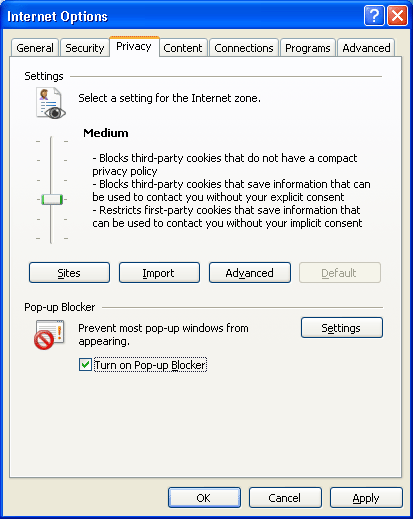
2. Turning on the pop up blocker is very much important. Navigate to Internet options ->select the Privacy tab and click Turn on Pop-up Blocker. In case you want pop-ups for some specific sites you can always add them to the safe list.
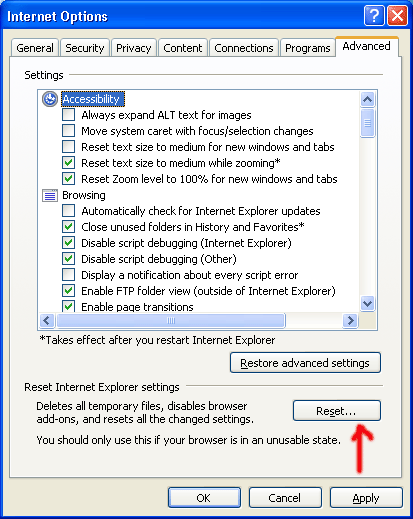
3. In any case you have changed the default settings and this has caused issues with the working of IE, then you can always reset the setting back to original one of the browser. For this navigate to Internet Options-> select Advanced Tab and click Reset button.
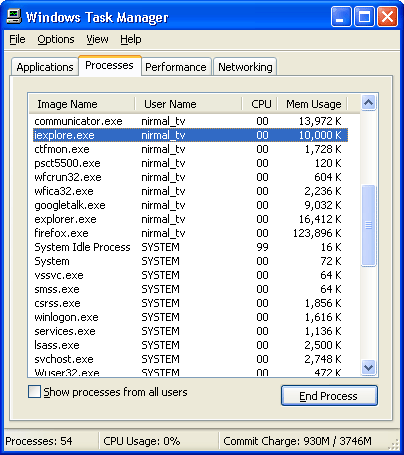
4. If Internet explorer takes too much time to respond, go to task manager and select the Processes tab. There you can find the entry iexplore.exe, select it and click End Process.
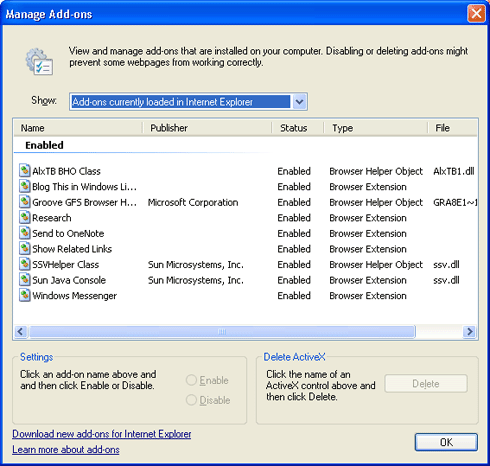
5. Add-ons can be a source for attack, so disable suspicious looking add-ons. To do this, go to Tools-> Manage Add-ons -> Enable or Disable add-ons. If you find any suspicious looking add-ons, then do a search for it and find out if its having any potential threat. In case it can cause problems, disable it.
If you like to add any more tips to it, please share it in comments.






Nice info Nirmal. I have had some bad experiances with malwares and viruses .
The best advice for safe browsing would be to ditch IE! IE’s just getting more bloated, and the features are usually 2-3 years late. Get Firefox if you’re a sucker for extensions, and Opera if you need lightweight, quick browsing.
Flock might be a good alternative too, as it has FF’s extensions, and is lighter (as said by Duncan Riley at TechCrunch).
@Madhur,
Glad you liked it.
@Sumesh,
Your suggestion is good, to move to another browser, but there are lots of people who like to stick on with IE.
Why bother with all this shit? Move to Firefox, Opera or Safari?
Sorry to hijack the discussion. 😀
Nirmal-
Good tip for IE users.
Opera and Firefox are good browsers but still many people use IE. I also get requests from readers for writing posts on IE hence in the recent I had also put some tips for IE. 🙂
I agree with ashwin 😛 , most of us have shifted to firefox or opera, but still the info provided is really good. 😉
I use IE7 Pro Add-on for my IE it provides the best security and ad safe options that are not available in IE.
Great article Nirmal, very informative! Thanks a lot. I am using IE7 Pro too….I’ve been switching back and forth between IE and Firefox because Firefox eats up a crapload of memory for some reason.
THanks nirmal, now I’ve got 1 post idea 😆
Firefox is way better… No need for all this crap! 😀 BTW, nice post, Nirmal.
Thanks everyone for the suggestion of shifting to Firefox, but problem is that Firefox eats up lot of memory when you open too many tabs. IE7Pro is a wonderful add-on which has lot of features.
@Mayank,
Whats that idea? 😀
The best to do is to use an alternative browser such as Firefox or Opera 😉
Nice one. Even nicer if IE users migrate to Firefox. :D. I am in your team @Ashwin!
Hey, this is really helpful information. I used Windows Live OncCare online scanner and it helped me removing some of the issues. 🙂
@Sujit,
Glad that it was useful for you.
when i open internate explore the window is apper sortly.
i want a password are should be open before brouser opening. why pls maild idea.