

Using keyboard shortcuts are the easiest way to save time and MS word also has lot of in-build keyboard shortcuts to improve productivity. The complete list of keyboard shortcuts for MS word can be found in Microsoft’s website. Word allows to create custom shortcuts by which you can create your own shortcuts for commands, macros and other tasks.
To customize the keyboard shortcuts, navigate to Add or Remove buttons (in the toolbar) -> Customize. Here you can see all the toolbars and below this there is a button, Keyboard.

Once you click the keyboard button, you can see all the keyboard shortcuts that have been assigned currently. Here you can type in the new shortcut key for the particular job.
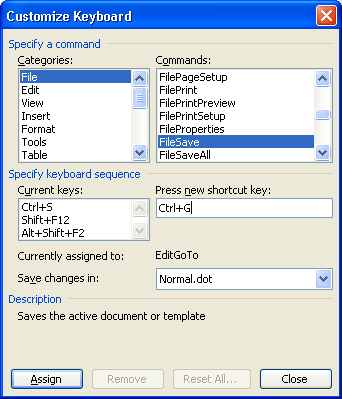
Here I have assigned CTRL+G for file save and it will replace the existing shortcut. Similarly, you can assign the shortcuts for all tasks frequently used.






yes it is useful…
Hey cool stuff! I just wrote a post on Word shortcuts also! Thanks for the tip!
I use OpenOffice.
Maybe you could compile a similar post for OOo?
Cool! Thanks for this useful tip 🙂
@Sumesh,
I’ll try to write about that also.
thnx for this i just used it to help with my GCSE course work lol
This is about Keyboard shortcut, but recently i came to know about custom shortcut button in MS Office.
From this option you can add your Favorited option to the quick access panel.