

Of late few of my blog readers using Internet explorer pointed out to me that there was some error happening while loading my blog in IE. Around 25% of my readers use Internet Explorer to read my blog. I check my blog frequently in IE and many times I too encountered this error, but initially I thought it was some error in my browser. The error is really frustrating as it shows only in IE and not in Firefox or Opera or any other browser for that matter.
The nature of error is that it shows up when the site is loads completely. This is what you see when the error occurs.
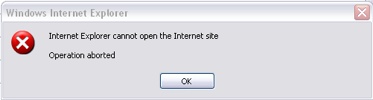
Once you click OK, the page is replaced with “The Page cannot be Displayed” error. How to fix this error?
A bit of Googling gave me some idea into this error. This error can happen because of many reasons. Microsoft has even a patch for solving this error in IE.
1. This error can happen if Google Map API is present in the code. If you are getting this error because of Google Map API, then the fix for the problem is available here.
2. If you are not using Google API and still getting the error, then it could be because of this reason.
It is not possible append to the BODY element from script that isn’t a direct child to the BODY element
If there are any Javascripts running inside the body tag or inside a table which is directly a child of body, then most of the times this error is bound to happen. The solution is to move the script to the top or bottom of the body tag or even moving it after the body. The script can also be put inside a function and then calling it from window.onload. Another solution to this problem is to add defer=”defer” in the script tag.
I checked my code for scripts which were running inside the body tag and was a direct child to it. Then I moved all my Javascript codes to bottom of the body tag so that it will not interfere while parsing the page. I tested my blog in IE after I made the change and I could see the difference, the error was not happening any more. I checked in different versions of IE to confirm. In case you are using IE and still getting the error on my blog, please do inform me.








I use firefox. So I don’t see any problems in your blog. But this may come to use when my blog’s IE readers complain me of same error in my blog. Thanks for the solution. Bookmarked and stumbled!
The easiest way is to switch to Firefox Believe me, I just don’t understand why people are still stuck with IE. ❓
@Nuts & Milk,
Firefox is best one and popular among bloggers, but IE is still the most popular browser. Although I dont use IE, I corrected this error for the 25% of my site visitors. 😀
This solution is too precisew. But u know thgis error does not happen everytime. I face this error during a specific period at around 3 am to 5 am in the morning. And this also sometimes happen to the dashbord area in my admin panel.
@Ajay,
If it happens to your dashboard also, then I think you should try the Microsoft patch. Check this page for more details.
Thank you for pointing this out, it was exactly the problem I found when investigating about my loss of visits.
All I have to say is, I Hate Internet Explorer.
Internet Explorer never learn well from firefox. Or they should let Firefox “eat” them and become one! 😀
It doesnt occur every time when a page is loaded in to the browser, It does happen only few times, once the error occurs, if you reload it once, then the problem should not arise, May be there could be another reason
Thanks Nirmal,
Thanks a lot for sharing, I was irritated with those CANNOT FIND errors when go to dataone.in for checking my bandwidth usage on IE.
@Andrea,
Hope you fixed the problem. 🙂
@Praveen,
Its does not occur every time and reloading the page solves the problem. This was the same case with me. A script inside the body was causing this error.
@Rishi,
Glad that it was useful for you. 🙂
*gasp* You need to start pimping Firefox/Flock and Opera more in your posts to help remedy this problem.
@Kyle,
😆 That was a nice suggestion. BTW what the IE percentage in your blog? 🙂
IE is still a popular browser in general public, and you can not ignore IE visitors.
@Ashok,
I completely agree with you, IE is the popular browser among general public although Firefox rules among bloggers. 🙂
Thanks for this Nirmal , i was facing this problem with your blog and with sizlopedia too. I didnt think of informing you as i thought there was a problem with my computer .Now hopefully it will be fixed .
@Madhur,
Initially I too had the impression that it was my computer problem, when many of the readers told me about this, I tried to investigate and found the reason. I hope the errors are not coming now in my blog. 🙂
Thanks for the tips. I solved my problem by adding defer=”defer” in the java script tag. 😀
i often get such error’s .thanx for sharing.. 😎
whats a javascript??how do i get there.or how do i go there in my computer??? ❓ 😥
Thanx for the solution!! It solved my problem too 🙂
Ok, here’s a twist –
there is a site that gives me the error when I go there directly , but doesn’t when I go through an anonymous proxy (both cases using IE explorer) Any thoughts on that? I’m wondering if this ner-do-well is somehow using this as a way to screen by IP…
@Gendron,
It may be due to the fact that proxies may be blocking scripts, so it may not show the error.
hi
i had the same bug in my code and once i put the inline javascript at the end of body tag it started working fine.
thx.
defer=”defer” solved my problem with IE 7. Thanks for sharing.
Hello, I’ve read your fix, but I’m afraid I still don’t understand. 🙁 I’ve been using the same webpage for the past two years as my homepage, and just today it started giving me this error. I did not make the script for the page, all I do is run the account (deviantART). It involves no script editing, and from all the googling I’ve done, every person with this problem has it on a page that involves something where they control it.
I’m not very computer savvy when it comes to code, but give me a link and I can follow instructions! Speaking of which, do you have a link to the Microsoft fix? I cann’t find it and am very frustrated that I can’t check my deviantART messages because of a stupid glitch. 🙁
@Pink,
I’ll try out the Microsoft patch. I dont have the link for it, but will post it soon. Let me search for it.
@Pink,
I didnt get any errors when I checked your webpage!
Thank you for looking for the link – and thank you again for letting me know that it’s just me. 🙂 I await your responce!
@Pink,
I think you can try moving the Google analytics script below the body tag.
🙁 Will dA let me do that? I’ve asked some techhies on a forum I browse, they seem to think that adding/changing codes is for people who run sites, no people (like me) who are just browsing and get the error. Should I contact dA about this?
@Pink,
I think you can contact DA and tell the problem if you dont have control of the settings.
Some other sites give me this error but not yours.
Also…. Never put a style (inline in my case) of white-space:nowrap; on a element, because you will get the same error. Learned this after a whole day of ripping a page apart today.
.. on a “textarea” element that is, didn’t come through in my last comment.
Hi, Thank you for your solution. I also wanted to let you know that I am currently facing JavaScript error in IE on your website.
Am getting this error on Gmail after logging into it, so am stuck with a blank page at – http://mail.google.com/mail/ 🙁
Dunno who to blame, Gmail or Microsoft 😀
Getting this as well when logging ONTO GMAIL. A single reload usually does fix it, but sometimes even reloading doesn’t work.
Since I have no control over Gmail code, telling me to mess with the body tag is NOT an option.
Also, unfortunately using a different browser is NOT an option for me since my employer relies heavily on MS technology.
That being said, I should also point out that I NEVER installed anything google (API or otherwise) on any of my machines, so I don’t see how the google API fix will solve anything.
Can someone please help?
I’m also having the same problem………..
I have both IE and Firefox but I like IE because it displays web pages very nicely.
Firefox has a very coarse display. The web text and graphics simply don’t display as nicely as in IE.
If anyone knows why that is so please drop me a mail. – dar(dot)millionaire(at)gmail(dot)com
i am also getting the same problem when i log in to gmail using IE7. what i do is delete the history, temporary internet files and the forms and then my mail loads properly. but after i sign out and sign in again, i get the same error message and i have to do the deleting of history, temporary internet files, etc. all over again.
how do i permanently solve this problem?
Simply use Firefox. It helps u.
Hello,
I am having the problem while using mootools.
The article here http://talk.cmyweb.net/2008/01/26/ieoperation-aborted-solution solves everything.
Hi,
I’m getting the same problem too. Can someone please provide the step-by-step to change the defer=”defer” in the java script tag.
Thanks…….
I had this error where in the onmouseover event of elements on my page was code referencing other elements by ID. No mouseovers should occur untill the page is entirely loaded. When I load the page while the mouse is already on the position where the element will be rendered that has an ‘onmouseover’ event, this error occured. I solved it by disabling all onmouseover code untill a flag startMouseOvers was set to true in the body.onload event.
Hi,
I am getting the same problem. I am using FreeTextBox editor in my page. I am not using any javascript block. The text editor calls javascript files internally.
Please Help.
Thanks.
i am hving problem in my IE. It shows IE has encountered proble and needs to close. Will you be kind enough to let me know the remedy.
How to install FireFox? I m having IE . Do I have to uninstall it first or Can I run both concurrently. Plz explin.
Do I have to upgrade to SP3 s my XPSP2 is running well and good. What are the benefits of SP3 . Is it really necessary to install SP 3. Plz intimate
@Purann,
You can install Firefox from here- http://www.mozilla.com/en-US/
Where can I find the Microsoft patch for IE7? The one mentioned above is for IE6.
Hi,
I have this problem when accessing a web application which I test using a testing tool, and the error occurs only when I am recording the applications (business process), but not when I am just browsing through it. Do you know what might becausing it.
Thanks.
Hey guys.
Ive spent HOURS and HOURS and HOURS trying to fix this.
I did everything any1 could think of!
On my page, i have at least 10 scripts. mootools, lightbox, and some other marketing scripts.
The FLV Video was loading and working 100% fine on Firefox.
but it wouldnt load on IE!
When i added the defer=”defer” something else would stop working.
The window.addEvent(’domready’ and ‘load’) did not work…
anyhow, nothing worked!
THE SOLUTION IS!!!!!!!!!!!!!!!!!!!!!!!!!!!!!!!!!
Take your all the way to
OUT OF THE BODY TAG!
This is one of the reasons that it doesnt work.
Now…
Put the script inside the HEAD TAG!
function startvideo()
{
var s1 = new SWFObject(’player.swf’,’ply’,’210?,’170?,’9?,’#FFFFFF’);
etc…
IMPORTANT!!!
Now on the Body tag, add the following:
AND THERE YOU GO!
cheers!
Hi I am experiencing this problem – all pages where we have Google Map on doesn’t work and instead gives the error message above…
The link above to fix the problem doesn’t seem to work from my location… the link to ryangrant.net – Can anyone put in the colution in this blog insted… and remember to quote Ryan Grant for it? Thanks…
Hello, I’m getting the error message when I checked your site on IE Version 7.0.6000 (WinVista). On Firefox is okay. I’m having the same problems with my blog. I didn’t change anything, just added a new post then problem started happening.
Hi Nirmal. I am getting same error in your website in IE 6. Please check.. Thanks
Probably it is happening due to sitemeter code which you are using in your footer. I was also using the same and getting the error, now I have removed the sitemeter code. My blog abhisays.com is now working fine in IE 6.
So annoying this problem. I just noticed this same thing happening on my site. Your site by the way still has the same error in microsoft explorer. Same horrible error. ugh! I have found nothing that fixes this yet. Really frustrated about it and loosing a lot of traffic and visitors because of it 🙁
My site works great in firefox.
@Abhishek Kumar,
Yea Sitemeter was causing the issue. I think HTML version will solve the problem.
@Anthony,
I have corrected the error on my blog.
This will give you all a definite fix. Go to tools: Internet options: security : Under restricted sites add this site : http://*.sitemeter.com , hit close and you’re all set!
To everybody who started getting this error just yesterday or today, check to see if your website is using the tracking software Sitemeter. Their javascript version is now dishing out this error to every IE users and it’s hit big sites such as Mashable and Perez Hilton among thousands of others. To fix it, simply remove the tracking code altogether or switch to their plain HTML version.
How to fix the bug, especially on August 2nd in relation with Sitemeter (7 methods, plus the cause explained): http://motls.blogspot.com/2008/08/fix-internet-explorer-7-with-sitemeter.html
Thanks for all your input – YES! This exact problem started happening to me yesterday on my own web site and I thought the server was down but it wan’t. So I installed Firefox and all was good. Then I upgraded to IE 7 and the problem persisted.
I think you are right. It’s the sitemeter code but I don’t know how to fix it.
Here is my code – can you tell me what to do?
Any help is deeply appreciated!
Dee
Still I am getting the operation aborted error on IE
6.0.2900.2180.xpsa_sp2_rtm.040803-2158. It resolved on mozilla and IE 7. Please reply me.
I added the defer=”defer” code to my Javascripts, which fixed the IE not loading issue, but the fix turned off all the scripts! It’s not 100% effective for me. Is there another way?
Just to say, if anyone is still having this problem and using maps.google.com, have a look at the google api version the url is referencing. The “v” query param specifies the version. Use version 2.118 (as in &v=2.118). You have to be version specific here. This version *does* work with IE6. Just stating “&v=2” will NOT work.
Hope this helps someone 🙂
Another cause for this error message:
Having a self-closed (div) tag near Javascript may cause this error.
Having developed an app to run as application/xml+xhtml in Firefox, I needed to back-port it so it also runs in IE. Self-closing divs are allowed in XHTML 1.1 when served as application/xml+xhtml, but IE chokes when it sees those when served as text/html.
if you’re having this problem, check for any unusual self-closed tags ().
the problem can also occur if you use a ‘domready’ in a window.addevent. Try using ‘load’ instead.
Thanks so much. Using the defer tag worked for me – this was causing me big problerms!
You may try using the https path instead of http path….
https://mail.google.com.
For me it worked.
-Rakesh.
Had the same problem with IE (error message)very annoying.Quickfix,do what Sergemeister says will fix your problem.Thanks Serge.
I got this error and solved it. I am using google adsense. I was changing the php code of my web site and commented the adsense code through automatic feature. Apparently, this made IE mad. It seems like it might happen if you put HTML comments “–>” “<!–” wrongly into jawascript.
Thanks for the help fixing this error. I had a script inside the /body tag. I moved to to outside the tag and the error went away.
some scripts have to run from within the body tag.
just a quick note:
its not the problem that the scripts run from body tag, its
more the problem if you use a script and do not include the full path to it.
had this problem yesterday
script was adressed like this:
the error was gone when puting this in:
I added the Google translator tool to my blog and now I’m getting that error in IE also when I click on translate. I took it off and added the wordpress translation plugin. I am still getting that error. I am not getting that error when I use the tool on other people’s blogs using that same plugin. That’s weird isn’t it? Once the plugin is installed, you just drag the widget into the sidebar so you can’t really edit. What should I do?
hi,
i used in script deffer=”deffer” but not work, plz give another solution
Thank you,
Vimal
Thanks much! It solved my problem! 🙂
Apparemment l’appel à Lightbox, normalement réalisé quand la page est complètement chargée, est réalisé à la fin du fichier lightbox.js.
Sauf que la vérification du chargement complet de la page n’a pas l’air très efficace.
Je conseille donc d’utiliser la fonction “addEvent” déclarée ci-dessous :
function addEvent(obj, evType, fcn) {
if (obj.addEventListener) {
obj.addEventListener(evType, fcn, true);
return true;
} else if (obj.attachEvent) {
var r = obj.attachEvent(“on”+evType, fcn);
return r;
} else {
return false;
}
return true;
}
Et donc de modifier l’appel avec cette fonction. On a donc :
addEvent(window,’load’, function() {
new Lightbox();
});
// Ici l’ancien appel :
//document.observe(‘dom:loaded’, function () { new Lightbox(); });
Cela corrige le problème.
HELLO EVERYONE!!
just cut and paste your codes into the tag. this will help. 😀
Share this script works fine but i had to move the Google Video Ads from above the Bottom_top div to get mine running without errors.
Working fine now thanks for the fix info.
Thiis is what I am looking for but it is really weird. 1 week ago my wordpress works with IE ad I did not upgrade my wordrpress or installed new plugins. It just stopped working
I had this problem because of invalid html tag!
I had
[span] [font] text [/span]
without closing [/font] tag, and had this error in internet explorer, but only then, If I had dynamicly generated html with javascript at the end. So look for html bugs.
plz can you help me….i have the same problem…and i can’t fix it…
@ John
“plz can you help me….i have the same problem…and i can’t fix it…”
You have to move your javascript to the top or bottom of the body tag
this is your website content area
you can do this in code view buy using notpad and saving as all files> index.html
download your index.html page from your server host and edit the javascript in code view, now reupload to your server and view 🙂
Thank you so much. Moving Javascript codes to bottom fix it.
hi… i’m facing the same problem… i dont know how to edit the script. somebody can please help me.
Whats internet explorer? Whats that? Ohhh you mean the big blue E !!
😉
Here is the reason why most people use Internet Explorer 🙂
thank you very much!
I had this problem and it solved by using ” defer=’defer’ ” in the script tag !
Thanks for the tips.I’ve solved my problem,put all the javscript code after the tag and its working fine….
Same problem i faced, your works good.
In my case, i positioned the container as absolute, So it should be inside of container.
How can i rectify my problem…
Please help me
Thanks,
Regards,
Prabhu S.N
http://support.microsoft.com/kb/927917/
thanks for tips. I solved this problem by adding my javascript bottom of the page.
Thank you so much….I was about to start pulling my hair out. You rock!
Nice post……. Thank u so much
thx, had the same problem 🙂
I have the same problem… however defer did not help, and I cannot aford to move the js from the div it is. Any help on my problem?
Thanks so much for this fix…I added the defer=”defer” to the php template of my Joomla site and it fixed it immediately…
People, you are making this far too complex…Forget about modifying code!…The work around is:
The work around is to go into IE —> Tools —> Options —> Advanced —> Put a check in the box “Use HTTP 1.1 through proxy connections” Apply/OK
Worked for every user so far where I work!
The solutions is open the index.php of your template and find the
And after you have to open the tag body
Thanks Nirmal, the root cause of the problem is the js within the body tag
You are awesome man, i was getting this same issue in another situation, and putting in defer=”defer” did the trick, working great now. Thanks so much!
Hi
This blog helps me to fixed one page on my site. i used ” defer=”defer” ” and i had no problem anymore,, thanks very much
Hi Guys,
I fixed this problem to move the javscript outside the body.
thanks & regards
saras
OMG you rock! Thanks so much! I had a client that was getting this issue (not the most savvy with internet browsers) when viewing a website I built. I was using swfobject and noticed that it didn’t occur when I commented out the JS write function. I added defer=”defer” to the script tag and it fixed it 🙂
This was very helpful
Find the link or shortcut to the site. Go to Tools, Internet Options, Security, Restricted sites, Sites, Add
Just paste the site , click on add, close, OK
The site should now be secure and your computer should open it.
thank you, i solved this problem to ur way
Thx Jeanette, this solved my problem
That worked for me Jeannette. Thank you
Jeanette,
Thank you so much. I am not computer savvy but this is what I needed. Step by step instructions. Thanks a million.
Hi Nimal/anyone
Can anyone show me step by step of how/where to add the “‘defer” in the script or move the script of the body tag as it happen to my blog also.
Please Help! TQ
Had the problem all of a sudden after it worked for years. Deleted the “followers” feature in blogger and problem went away
thansk a lot buddy u r comment helped me a lot .i use defer=”defer” it works fine for me.Thank u
Hi gusy….
WordPress Guru here….
Dear all friends, If you are using WordPress latest version for your site and facing this silly IE error…
No worry, i had also such silly error… Now it solved… now runs well in IE.
Run my customer’s site here http://www.chefmartyrich.com
It was occurs due to LightBox 2 plugin, If you are using this plugin and facing out this silly error.
Simply De-Activate LightBox 2 plugin. Then runs your site. it will work fine.
Thank you all guys for the Hot discussion for MS IE silly error…
Share your more ideas to fix this error…
man.. this drives me crazy.. what if i don’t have any google map related javascript and still getting this error?
For over a year I have been having trouble logging into sites that use a USER Name and Password with IE8.
First noticed it with Konica Minolta Print servers then HP Print servers and Sonicwall Firewall. Now it is spread to numerous sites and even our web mail servers and Network Solutions Servers. Microsoft dies not seem to see anything wrong and the issues and Network Solutions says to use IIE ver 6. I use Mozilla for anything that does not display properly or will not log me in after the first try. If anyone has any details or fixes I would appreciate hearing them.
It is even hitting Outlook Mail that uses POP servers now. They may or may not log in correctly with NO Cahange to the setup other than IE8 upgrade/rollout. It is only going to get worse with the latest push out of IE8.
Thanks!
Doy C. Sneckenberger
VP Hagerstown Block in Hagerstown, MD
[email protected]
I use Firefox at home, but that is not an option here at work. I wonder if there is a solution from the user side to fix the problem. When I clicked the link to ryangrant.net I got another error.
Thanks a lot for that post – i solved damn problem with IE finally.
OMG WHAT A PAIN IN THE A$$!!!
OK Mine was all because of 1 missing at the bottom my code.
In 12 years of developing, this has never happened to me before.
Make sure you guys check your DIVS
I am having this problem in IE while loading a birt viewer report with prameters.
I am having this problem in IE where i have included shadow box-base.js and Contentslider.js
These two files are conflicting. If i comment any one of file in these two, IE is working in good condition. So now i have shifted my shadow box code to after the body tag. So now it’s working.
Thank’s for your idea.
I’ve actually found that there may be some third party add-ons that alter the page content from within. Try disabling various browser add-ons to find out what the culprit is. I’ve found that it was my IE7 Pro add-on that was causing issues (perhaps with its live RSS clickable link list after an html scrape).
Go to Tools, Manage Add-ons, Enable or disable add-ons, then take’em out one by one until the site in question loads correctly. Then you know the culprit add-on.
Facebook and Bing recently have been causing me problems. While it is an annoyance, it’s apparently a design choice (though the redirection to an error page is really annoying) – the error itself is understandable, programmatically. Modify closed tags. Script that tries to edit an incomplete/unclosed element, IMO, is faulty, and should be fixed (such as moving script to the beginning or end of the page content, or to the HEAD block).
thx thx thx… Thanks !!!
The Lightbox issue can also be a problem using MediaWiki.
– The post and the comments were very helpful since IE was the very last browser in my mind while testing a site.
hi im having an issue about internet browser not available i get a block error my wireless connection has connection but internet will not work i have windows xp hp pavillion pc can u please help me i dont know much about pc
thnaks sonia
Thank you very much. I have much more annoy with dynamic script. your solution is real solution for my annoy
why would you put defer=”defer” in the script tag? that disables it!!
One of the users of my website quoted saying this error occurred while accessing my website. I tried to replicate the same but coud’nt reproduce it with all the possible IE’s. What possible could be the reason? Does the load on the server too play a role?
My website works fine in firefox. But once u open it in internet explorer it says “Internet Explorer cannot open site…”
I read a lot about it… and there are several solutions. One of the solutions was to add a ” defer = “defer” to the javascript…. I did that… nothing happened.
The other solution is to move the java script below the body section and that wont work for mine. I have a Gavick Template (YourFlash) and the html files dont really have nothing in them. Can somebody checkit out? I dont know what to do, can somebody help??? http://tiraerax.com
Please help! I tried adding defer or moving them to after the body tag. It doesn’t help.
I checked more and I get “Object Expected” error at line 1053 which is which is part of this
1
Thank you a lot ! This helped me vey much !
This is an infuriating problem, I have just finished developing this site only to be stumped at the last !
hi frd its working 🙂 thanks for comments 🙂
Hi,
Great blog. The problem described in this post I had quite complicated, but I used the “refer” property mentioned here for solved the problem
Thanks and best regards
Thomas Arratia from Santiago, Chile
The problem it’s not necessarily javascript related, I got this problem because I had an anchor not closed at the end of the body tag.
Closing the anchor solved the problem.
http://htmlerror-info.blogspot.com/2009/12/operation-aborted-aspnet-lightbox.html
Thanx man you have saved my life
i tried your suggetions and now my blog http://kawishmagazine.blogspot.com work fine in INTERNET EXPLORER.
THANX AGAIN
BLOGGER.GNS
kawishmagazine.blogspot.com
may i know where is the freaking so called script tag?
a lot of blog said: you add this defer defer to the script tag over there
where is it
damn
thanks, I had no idea what to look for when i got this error.
i always get this message whenever i try to access Facebook but for other sites like Youtube, Yahoo, Google, etc. i can access them with no problem. I really want to try the Javascript : defer suggestion but i dont even know where to look for the BODY TAG that’s often mentioned here. PLEASE HELP this Operation Aborted Error is so frustrating (-_-)
Thx very much “Jeanette”
Hi, I am facing a problem to launch my web application. It says the page cannot be displayed. Its happened in the server too. But After I restart my server I am able to use without any problem. It happens offen. I dont hav any clue to findout the problem. Can anyone help me to findout hte issue.
Place the javascript before should solve the error.
Thanks ,
Great. second option worked for me.
i get this message whenever i try to view a vedio on youtube…..dont understand what you mean by scripts….pls guide mr thrugh alll the steps
peter i thnk ur solution is the smartest and quickest i hope it works out ~~~!!!!
it aborts most of the site that i open… i dont realy know what js scipt is… pls help me with this problem.. in a step by step basis….
I am having the same problem.
my site http://www.imyideas.com is not working in ie6. ..
I tried the defer=”defer” method. But it is also not working.
I don’t how to move the script out of body tag . Can you please help me?
or is there any other solution. ..??
Thank you very much! Putting my JS at the bottom solved my problem.
IE sux big time! I am not using it but from time to time I check my sites.. Now I see that some of them have that error and cannot find a way to fix this.. SUX!
Cannot open Internet Explorer at all. Have been using Mozzila but some of the sites I work with are not compatible with it. What do I do?
Thank you for your good services.
Dear we are also facing same issue at our website http://www.saveindianrupeesymbol.org while browsing the site in IE 6.
Still hunting for permanent solution …
You can turn off friendly HTTP error messages in Internet Explorer. This workaround still lets the error message appear. However, Internet Explorer does not move away from the page after the error occurs. This workaround works only for Internet Explorer 6.
To do this, follow these steps:
1. On the Tools menu, click Internet Options.
2. On the Advanced tab, click to clear the Show friendly HTTP error messages check box under the Browsing section, and then click OK.
3. Close the browser.
i installed the Ccleaner and ran the registry fix. Issue Fixed
i cann’t open facebook website. i’m using internet explorer 7. Everytime i try to open facebook site, it tries to download then suddenly stops and a pop-up says “internet explorer cannot download home.php from http://www.facebook.com“… please help me to have access on facebook site again. i badly need it… 🙁
i tried opening m.facebook.com and it works, but a hassle using facebook in mobile mode.
having the same problem, intermittently. similar problem with some other websites. any body have any suggestions wrt how to resolve this…?? thanks
Thanks for the tips. I managed to fix the “Internet Explorer Cannot Open the Internet Site- Operation Aborted” Error, however I’m having another java error – it is the java tm plug-in 2 ssv helper jp2ssv.dll error each time I open IE. Any idea how to solve this one..?
I switched to the new Yahoo Mail and now I’m getting the “internet explorer cannot open the internet site. Operation aborted”. How do I get rid of this?
windows update SP1 crashed my computer. I cannot open internet explorer Skype doesn’t work, etc. Cannot get on to Firefox so am using Opera – hate it. i want my IE9 back. I have uninstalled and reinstalled the update and internet explorer to no avail. HELP
To everyone who is facing the problem personally: stop using internet #$@#ing explorer, move to a better browser – chrome, firefox, or even abra-ka-dabra!
For the developers: we have to bear with it……because we cannot afford to lose customers because of internet #$@$ing explorer….:x
Anyone who has the operation aborted error when accessing some websites by IE7 (vista home premium), the error will be fixed after upgrading to IE8. I did that and it works! I’m using vista home premium edition so not sure if that happens to other op system running ie7. I think some web pages new designs do not supportor IE7 or IE just misses some components required by the webpage design to allow it to load properly.
Hi Everyone on IE7.. Found the fix.. install this patch from microsoft KB982381
LINK
http://www.microsoft.com/download/en/details.aspx?displaylang=en&id=21377
http://www.cnn.com is a good site to test it on.. seem to always get the operation aborted message from there
Adding defer=”defer” to Javascripts running within the body tag worked like a charm. You saved my day. Thank you!
thank you very much this really did help me.
Thanks for sharing this valuable information.This information is very useful and important for me.
Really nice blog i learnt so many things from this .
Thanks for sharing this valuable information
keep on sharing !!…
thanks this is very useful
thank you so much. This information was very helpful for me to find out the solution. Keep writing blogs like this.
Thanks for detailed explanation. Now IE is working just fine
Thanks for this good information about IE, now its working fine sir
I have long been looking for solutions to this problem, now its working fine, Thanks
Wow amazing !! Thanks for great solution. My IE is working ok..
Internet Explorer never learn well from firefox. Or they should let Firefox “eat” them and become one!
Thanks for Sharing valuable information of IE with us,
Thanks a lot for this. Whenever i wanted to visit the website pubgmobileonpc.com i was getting this error. Now it’s resolved thanks
Thanks for another great post.:)
On the Tools menu, click Internet Options.
On the Security tab, select the zone the site loads under.
Scroll down to the Scripting section, and set the Active Scripting to Disabled – prevents scripts or to Prompt – prompts user to run or not to run scripts.
Click OK.
and
On the Tools menu, click Internet Options.
On the Security tab, select the Restricted Sites zone.
Click Sites, click Add, and then click OK.
User is running IE7 on Windows XP.
So any suggestions?
Thanks!
I think only 1% only using IE browser. So no need to take much effort for IE bugs.
really worthy post it is working bro thanks for this.
Nice, really worthy post it is working bro thanks for this.
Really cool blog i learn so many good things from website
The blog was absolutely fantastic! Lot of great information which can be helpful in some or the other way. Keep updating the blog, looking forward for more content.
Thanks for sharing this information.
Thank You…Found Interesting and wonderful keep sharing welcome to Youth Education.
Are we still using internet explorer in 2019? Jokes apart, thanks for sharing it because I myself had to search for this solution when I was working on my uncle’s old PC.
Hello sir, very unic and useful information thanks for share this information
Are we still using internet explorer in 2019? Jokes apart, thanks for sharing it because I myself had to search for this solution when I was working on my uncle’s old PC.
Thank for information have good topic for Internet Explorer
Very nice write-up. I absolutely appreciate this site. Thanks! download and enjoy the professional photo editor tool named picsart.
Really Nirmal I didn’t bother about IE for anything still now but i changed my mind after seeing your writeup. Well done ya.
Once you click OK, the page is replaced with “The Page cannot be Displayed” error. How to fix this error gameloop 64bit?
can u tell me how to to increase traffice on blog
Thanks for sharing this information.
Once you click OK, the page is replaced with “The Page cannot be Displayed” error.
Thanks for this tips. These tips is very helpful for me to know that how to Fix Internet Explore Cannot open the Internet Site. So i read this tips, It is very helpful for me and great work.
So thank you for this amazing tips..
really nice information thanks for sharing man 🙂
Thanks Sir For Co-oprating With Us And Sharing With Us I loved Your Articales
This error can happen if Google Map API is present in the code. If you are getting this error because of Google Map API, then the fix for the problem is available here.
In this step, unable to download the file.
Why don’t you just use Google Chrome or Firefox instead of that dumb IE
Great info for fix internet thank you
Anubandham (GOG) for Android is a user app specially designed to be fully-featured schedule app. Anubandham facilitates Job Seekers and Job Providers through auto-matching in a highly transparent and user-friendly manner. Mobile App “Anubandham” facilitates users to find and apply for a suitable job posted by the recruiters and job providers. “Anubandham” is an initiative from the Directorate of Employment & Training (DET), Government of Gujarat. The App is primarily focused to connect the opportunities with the aspirations of the youth of the State.
There was very infomative artical thank you sir
i have tried it but stil they tell my update your framework then what’s the main problem?
Nice