

Most of us must have configured Outlook for sending and receiving mails. Some of the mails sent might be important and urgent and it may be important to know if the recipient has read the mail. For this there is a functionality called Read Receipt which can be configured easily on your Outlook. You can configure Read Receipt for a single message as well as for all the messages sent from your Outlook Inbox.
Steps to configure Read Receipt;
1. Configure Read Receipt for all Mails:
Go to Tools->Options->Select Preferences Tab. Here you can find a button named Email Options. In the Email Option window, select Tracking Options.
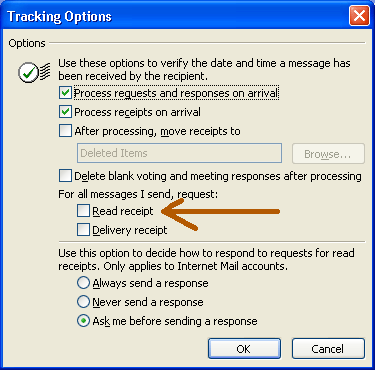
Enabling the Read Receipt here will make sure that all the messages sent from your inbox will have the receipt attached to it. You can even select the delivery report checkbox to make sure that the email is delivered.
2. Configure Read Receipt for Individual Mails:
To add a read receipt to individual mail, Select a new mail to compose. Click on the Options button.

Check the option-Request a read receipt for this message. You can also activate delivery report for a single mail.

If you liked this tip, please share it using the social networking sites.
NB: Images shown above are from Outlook 2003.






I guess everybody who works might know it… Good post for beginers 😛
@Sucharith,
It cannot be said that this is for beginners, I have seen lot of people using Outlook for years, but don’t remember the configuration and some of the simple tricks in this. Most of the bloggers might know this because they generally deal with Technology stuff.
I dont use Outlook, Thunderbird for me, anyways tried it and it works 🙂
Nice to see you talkig about these minute things. 😛
@Rajesh,
This is what I was mentioning in my previous comment. This is minute for a tech blogger, but for normal users, its really difficult to search for it.
The first time someone requested a receipt from me I was freaked out ’cause I didn’t know it could be done! Nice tip for a lot of users I’m sure. (#):)
It’s the same thing on Outlook Express, right? I use both Outlook and Outlook Express. Thanks for sharing! 😛
Hi there,
Your each & every post is very helpful.
My college has put on heavy firewall so i’m not being able to use any email client. 😳
If you have any suggestions regarding using an email client under firewall, plz do let me know.
Thank you. 🙂
@Grace,
The settings are same in both Outlook and Outlook express.
@Sunil,
I’ll try if I can find a email client under firewall.
@Nirmal
I really appreciate your thought and would be great if you can cover the same with ThunderBird as well 🙂
@Sucharith,
You can enable read receipt in Thunderbird using these steps.
Go to Tools -> Options -> Advanced tab -> Return Receipts button -> tick When sending messages, always request a return receipt.
hi, nice tip but i have some problems to get its usage. ok i configure my message that requests a read receipt, i actually receive read receipts but let’s say i sent 3 messages to a user in one day, all delivered to user and he/she read 2 of them next day one of them is not read yet. so next day i receive 2 read receipts but there is not a bind between the messages (or i can’t see it) all read receipts have at attached txt file and there is Original-Message-ID but should i compare it with all messages’ headers? Is there a way to define which message is actually read?
There is Advanced Find option which i can run on sent items folder. In Advanced Find there is Advanced tab. I define criteria : Field -> All Mail Fields -> Tracking Status equals Not Read
I know in that folder there are some mails not read yet (let’s say last read receipt has come on 10:30 and i have more messages asked for read receipt sent after this time)
It can’t find even those messages.
ps: by the way it is outlook 2003
I have a question on Outlook- if I receive a read receipt on a particular message and then a few hour/days later I then receive a Not read recipt on that same orginal e-mail it updates that tracking system- and yet I am left with a Read and a Not Read Receipt for the same message but on tracking tool of course it states Not Read. What does this mean and how is this achieved? It has happened on a few messages so its not an accident.
That’s really very nice post………..
Dawn, are you using Outlook 2007? There is a bug in 2007 that will send Not Read receipts to users, regardless of whether you have return receipts on or off. It’s possible that this bug is related to your issue. You might want to report it at the msdn forums. There is a 2-yr old bug that microsoft has been ignoring.
http://forums.microsoft.com/msdn/showpost.aspx?postid=4042788&siteid=1&sb=0&d=1&at=7&ft=11&tf=0&pageid=0
Please help. I have a question. Yesterday I read an e-mail and the sender received in this morning the receipt. The sender received the receipt on a blackberry . I am accused that I don t read the e-mail yesterday !!! For sure I read it. Can you tell me if there is any chance to prove that I read the e-mail yesterday ?
Thanks a lot, your post was very helpful.
Keept it up… Thanks again
thanks
Very simple format
helpful
thanks
People who request return receipt on every email should be drawn and quartered. They don’t need to know when I read an email, or even if I read an email.
Sometimes people just tend to forget and confused to look for this. This was with me now…… Thanks for this post … it saved my time….
I’m trying to open forum but sometimes there are no images on it 🙁
@Nirmal.
In outlook 7 whenever i sent email to many emai id.
& add a BCC to a single id.
I get devilry report for only one emai Id in BCC.
Mentioning final- recipient received the email.
But how would i now that mail has been delivered on other emails also…..
Thank u very much 4 Help
That is so cool this read receipt, i never knew outlook can go that far
I want to send an autoresponse to the sender of the mail that im reading as soon as i open the unread mail. how do i do it.
I did what it said to have a Read Receipt sent to me and it hasn’t worked…I also decided to do the delivery receipt to see if that worked and it hasn’t worked.
Thank you for this. I was getting so damn ticked because Microsoft Help Sucks. This was all I wanted
Is there a way that on the email receipt notification that you can configure this to also show the original message so you will know for sure what message was received.
Thanks for the help 🙂
Thanx for the assistance.
Thanks for sharing such a wonderful information
You can also help me for outlook 2010? i can’t work with it..
Thanks for your help………………
Awesome Post……………
Dial 1-855-665-4347-Dropbox customer care number for best Dropbox help and support in the market. You can call us any time to avail the best Dropbox technical support within no time.