

Once you have a popular blog, next thing is to measure the numbers of visitors coming to your blog. Blog statistics are very important to analyze the traffic and to know how your blog is performing. There are many free stats services that offer you a great range of features that help you successfully analyze your blog stats. Here I’m listing the top 5 free services for analyzing the traffic to your blog.

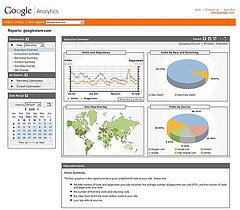
- Google Analytics: Google Analytics is one of the most common and preferred stats tracking tool used by bloggers. Google provides you with lot of features like daily report emailed, get report in excel and PDF format, external links to which visitors are leaving etc. This is the most comprehensive analytical software recommended for all bloggers.
- StatCounter: Statcounter is another free visitor tracking tool. This is again a popular web tracking tool used by many sites. StatCounter can give data regarding the last 500 visitors. Statcounter also has to option to track data in invisible mode.
- Sitemeter: Sitemeter is again a free web tracking tool which can track the activity of last 100 visitors to your blog. The invisible or hide option is only available in paid counter. Sitemeter also provides lot of options regarding the traffic data.
- 103bees: 103bees is an online tool for webmasters, bloggers and internet marketers that is highly focused on natural search engine traffic analytics. It also provides detailed statistics and in-depth information on the search terms that drive targeted traffic to your websites. 103bees allows you to build upon your organic search traffic.
- MyBlogLog: This is the most popular tool used by almost all bloggers which is evident from the widget provided by MyBlogLog. It also tracks the number of daily visitors and page views. MyBlogLog is owned by Yahoo.
There are few other stats tool like Feedburner, ShinyStat, Histats. I have been using all the five tools except StatCounter. Which counter do you use for your site? Share your thoughts on this.
 Technorati tags: Statistics, Google, Analytics, Sitemeter, Statcounter, MyBlogLog





I use Analytics but don’t visit the site to check stats instead have set up a daily summary email report that I read.
Other than that mybloglog which is a part of the other services they provide.
But My primary stats sites are reinvigorate.net and performancing.com they both are great and provide you with detailed as it happens analysis. So i just hop on these sites thrice a day and check my stats.
This is an important post. Stumbled.
One comment on 103bees: after 2 months all the important features get disabled. In this case Hittail is the preferred choice, as it is completely free (as far as i know).
I never heard of 103bees, but I use a program called HitTail Which is about the same from what I can tell. It doesn’t expire like Gili said 103bees does, so maybe you should check it out.
Great post… I also use my server awstats for my analytics. It seems as through as Googles, so I got rid of them and the more code in my page.
Nice list. I have never heard of 103bees before.
I use Analytics as well. For real time stat tracking, I use Reinvigorate and Snoop. The service is still in beta but you can apply and if you’re lucky, they’ll send you an invitiation. It’s at http://reinvigorate.net
I use Addfreestats which is free, of course. 🙂
the Google analytics look pretty comprehensive from here. i’m using none of the listed 😐 But using pmetrics once in a while. wonder if that is considered as a statistic tool?
I use Google Analytics, I am happy to see my blog growing 😉
I use Firestats:
http://firestats.cc/
and Clicky:
http://getclicky.com/2743
Snoop is an addictive one too.
Another good new tool is Reinvigorate ( http://reinvigorate.net/ ).
Proffesional bloggers may give Clicktracks ( http://www.clicktracks.com/ ) a try. But you need to pay to access most of the features.
But I have noticed that both Google Analytics and Reinvigorate under report statistics.
I use Statcounter, and m happy with it 🙂
I am using google analytics, mybloglog and wordpress stats plugin .. However I have a strong feeling that wordpress stats plugin is not up to the mark in providing correct data …Has anybody noticed it ??
I’ve tried all of these but my favourites are StatCounter and Reinvigorate. The Snoop tool is great. As Vinod said, it’s addictive too.
@Kanak: You’re right. The plugin is terribly inaccurate in providing stats. I noticed it and stopped using it.
I use Google Analytics, 103Bees and WP stats. I was also a stats freak, then was able to control my addiction to stats.
I use feedburner, mybloglog, google analytics, and bravenet. I think I am using more than enough for tracking my site:-p
Nice list. I use all of them except sitemeter. I also use crazyegg.
stumbled
I am using Google Analytics, MyBloglog. WordPress Syat and Statcounter.
Hmm, I think I am over tracking my blog 😆
I use sitemeter and statcounter to double check everything. There is a tool which can show how many are online on your blog and what they are reading. It is called who.amung.us. I also use that. I saw it in Techcrunch and netbusinessblog. So I thought of using it myself.
Tried HitTail after some of the suggestions here, but then it almost performs the same function as 103Bees only that it shows all the search queries. Not a bad tool for which we pay nothing.
I want to have some tool like who.amung.us but I prefer it to be private to me only. I’m not sure if that can be done.
Nice list Nirmal , I have used Analytics before but i prefer awstats , clean and simple ..
nothing better than google analytics! 😀
Hi there,
I’m using HitCounter and GoogleAnalytics.
Will check out 103bees!
Thanks for sharing.
Regards,
Calvin Chin
Looks like there are plenty of options for checking stats. As many have mentioned about Hittail, will try it out.
Thanks everyone for your comments and stumble.
Me too use Statcounter ..my love towards statcounter increased when they increase their log size for free.
I use mint & Reinvigorate. I find both of them are good in each respect but mint needs more and more work, considering that it is a paid one.
Mybloglog statistic is not good. It can’t represent the accurate data to my adsense clicks. When I see about 18 Clicks in my adsense report, MBL show 24 Clicks. I wonder how MBL recording the data…
@Ken Xu,
You are right, MyBlogLog statistics are wrong most of the times. They give contradictory reports with my Analytics and sitemeter.
I use HitTail and google analytics…i must say hittail is really addictive.
@ Ken : I use mybloglog for connecting with other bloggers. It is not the best stats tool
@ Abhishek : Hittail seems to be good but try reinvigorate and you’ll fall in love with it!
All good stat tools. For real-time stats, I really love Mint. Incredibly simple to use and check from anywhere. Also, very accurate.
Great discussion!
I like to use server-side statistics like FireStats, but for the sake of this discussion I do use Site Meter for certain things, MyBlogLog for ad tracking, and Feedburner for a few things as well 🙂
I have been using GoStats.com , they are free and good. The offer:
* Powerful web statistics reporting engine
* ALL GoStats features are completely unlocked
* You may choose to fully hide the counter or display as much web traffic data as you want
* Vistitor traffic displayed on the world map
* Min/max stats
* Custom period stats display
* High priority email response from GoStats support
* Feature rich, account management control panel
* Optional listing in the top sites list
* Comprehensive overview of the last 1000 guests
I use all the mentioned stats except 103bees.com .
I’ll try them as you recommend. 😉
I’d heard of all of them except 103 Bees, but I only use sitemeter. I think I’ll sign up for google analytics soon, but I don’t understand why they need my phone number.
@Ayush,
Thanks for the features.
@Oznob43,
I think you should sign up with Google Analytics. They give you lot of options.
Thanks for the advice, I probably will, but the phone number thing is still a little bit creepy in a way. I’ll just make one up but it seems weird that they’d even ask for it.
Agh, I feel dumb now, the phone number isn’t a required field. Never mind.
@Oznob43,
Good that you finally registered and the phone number thing was really funny. I was thinking, I never gave my phone number when i registered for Analytics. 🙂
I’ve used Google Analytics for some of my other sites.
But, didn’t installed it for my new blog.
But, now i will install it. Inserting Google Tracking Code is extremely easy for a blog rather than a static web page as the code needs to be there in every page to be tracked.
In WordPress, it’s just a matter of adding the code to the footer.php
No doubt about the quality of service. It’s great and i feel, is the best…
(wanted to give u a stumble, but, currently in Opera..will do that in FF & it’s high time we need a stumbleupon toolbar for Opera :P)
I use GoogleAnalytics now. I’m visit reinvigorate site and they have interesting features. Thinking to use it but don’t know how to register there. Thank you for mention this.
I use Logdy and I’m very happy with it.
Now I Am Using All Of Them…
– Anurag R. C.
http://www.pcdrome.com
Latest Post:
http://www.pcdrome.com/2008/09/webripper-rip-everything-from-web/
Analytics is enough and best.
I am using it and very happy…. 🙂
i think that GoogleAnalytics is better than other tools 🙂
Cool site, love the info.
[…]www.nirmaltv.com is other wonderful authority of advice. Online Car insurance claims […]