

GMail is one of the best Email services available today with lot of features and an excellent spam filter. Another feature of GMail is that it allows you to create multiple e-mail ID with a single account. All you need to have is a GMail account and here is a simple technique to create multiple e-mail id’s using this account.
Multiple e-mail ID can be create using the feature of plus addressing. To create this, go to the Settings option in your Email. Navigate to Filters->Create new filter.
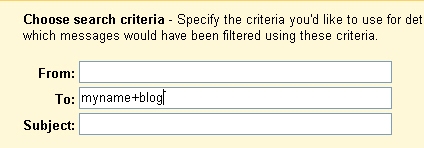
Here in the To field enter your email ID + the name you would like to create. For eg; if your Gmail ID is [email protected], you can create a filter [email protected] all your mails regarding your blog. Next you need to specify where you would like the mails to this ID sent to. You can select anyone of the five options, sadly there is no create folder option.
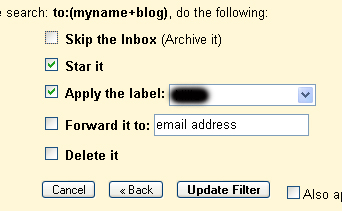
Thats it, now you can use the email ID [email protected] and all mails to this address will be filtered according to the criteria you have selected. This is particularly useful if you are subscribed to news letters and you don’t read them often. By this method these mails can be directly sent to Archives folder.
Many of you might be already using this service and those who are not, start creating new IDs.
 Technorati tags: GMail, PlusAdressing








Very cool…GMAIL RULES!!!!
Yeah I am using this method to filter out my incoming gmail.
thanks for the great post never knew these things about gmail. also i miss the create folder option you only have a option of applying labels in gmail whereas in yahoomail you can create a another folder and move all your mails to it.
I used this option with a few sites and it worked great, however it does not work with certain sites which do not accept + in the email address.
It would be great if gmail would provide a . or a _ as an option.
Keith
I might have to try this one out. Very convenient tip. 😀
@Shashank,
One thing sadly missing in GMail is the folder option which is available in most of the other mail services.
@Keith,
You are right, not all services offer plus addressing. I tried this with my live mail and its not accepting ‘+’.
@Brown Baron,
This is very convenient if you have subscriptions. Do try it out.
Yes, a real nice service by google. These services can be expected by google only. Still, what i feel is that instead of “+”, they could have given the option to use “_”, then it would have been more fun and more realistic email ID’s
@Vaibhav,
I too felt that instead of +, they could have provided ‘_’ as GMail dont allow these in normal Email ID. Plus addressing is also supported in other mail services, but not all.
hey will you please remove that joke toolbar ad from your site …i am home presently …it makes me little uncomfortable .
@Shashank,
Which ad are you referring to? I didn’t understand the Joke tool bar ad! 😥
Instead of the folder option gmail uses labels, so I guess we have to be content with that..
I did make a post about this sometime ago..
http://www.siteguide.us/2007/02/22/gmail-generate-unlimited-e-mail-addresses/
And I’ve used it ever since.. But it is better to use disposable mail IDs
@Vijay,
Even if GMail provides label option, still the mail would be in Inbox itself, whereas in folder option, it would go directly to that specified folder.
If we want to subscribe for news letters, its best to use this method rather than going for disposable ID.
other than create folder, Gmail doesnt even have block email address option like in Yahoo etc , where you can block the emails from a particular address. Instead it directs it to spam folder, if you report it as spam , but anyway i have to check my spam folder as at times my legit mails also end up there. 🙁
in which too animals are there and its says:
joke toolbar
is there something about this picture that makes you laugh. 😯 ..its a bannerconnect ad .
@shashank,
Its not possible to filter out those ads in Bannerconnect, but I have removed that ad and kept another one.
but its still there…that means you don’t have control of the bannerconnect ads displaying at your website..ok leave it .
@Shashank,
I thought you were referring to the ad after the first post, but i think you are referring to the ad just below this comment box. You are right with the fact that I cant control the banner connect ad, I’ll have to remove all banner connect ads. 😥
Thanks nirmaltv, this will make organizing my mails much easier.
I never knew this. Thanks. Will come handy.
Nice post nirmal, i never knew this option existed. 🙄
Nice Post Nirmal. Thanks
Yeah, this is one of those cool features GMail has to brag about. Works best in handling spam (in my case)
Stumbled this post!
great trick.. this is why gmail is the best.
Thanks for the tip!
Thanks everyone for the comments and Stumble. 🙂
The lack of folder has sometimes frustrated me, but I am getting used to labelling now. I would prefer folders anyday of course
Hmmm vry koooool man. Nice tip.
@Vijay,
Almost all the Email service like Yahoo, Live mail and even Rediff allows folders. Cant understand why its still not implemented in GMail.
Thanks for sharing this mate! 😉
Great article Nirmal , never knew about this thing .
Cool tip! I love Gmail.
Its true that there is no folders in Gmail but filters works in the same way. To make it work like folders check skip inbox and apply label. This will make all the mails of selected category to be forwarded to the ‘filter’
THANKS FOR UR USEFUL TIPS……
Yeah good one….but + symbol in the mail-id looks a little weird…they could have used something else…
Useful tip.
Nice tip didn’t knew about this before certainly looks cool
I heard about this somewhere last week, and someone suggested adding something like +whateverforum or +whateverblog whenever you have to enter your email somewhere, so that you can see if anyone sells your email address. Do you know if that would work, or would spammers automatically remove the +?
@Oznob43,
I’m not sure if spammers will remove it automatically. And also some forum dont allow you to enter the email id with a ‘+’ symbol.
Hmm…pretty good tip…Thanks for share this with us…We can also use unlimited yahoo addresses…for it click on option and choose dispossible mail addresses…
great share, thnx alot =)
Great post! This goes very well with this video tutorial on how to stay organized with Gmail:
http://www.eztechtips.com/stay-organized-with-gmail/