

Ever wanted your outlook to display your mails in different color based on the sender? If yes, here is the simple way to customize your Outlook. 🙂 Open your Outlook and go to the Tools menu and select Organize.
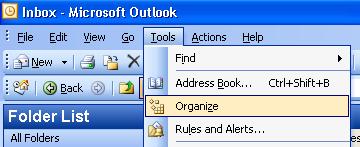
Once you select Organize menu, a options box will appear above the mails showing different ways to Organize Inbox.
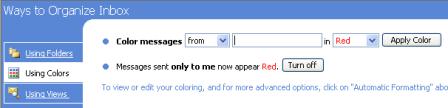
Select the option Using Colors (shown in the picture). There are two ways to customize, one is color messages from a particular sender or messages sent to a particular sender. A text box is available next to this option where you can enter the Email ID of the person whose messages you want to customize with colors.
You can chose the color from the available list of 16 colors. Once you have selected the color, click apply color. Done! now all the messages from that particular sender will have the color selected by you. 🙂
Once you have made changes to the colors, you can even change the font, style and its size. To do this, select automatic Formating box at the right corner of this box (Organize box).
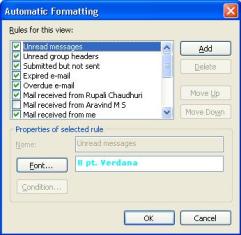
In the Auto Formatting box, you can see all the customizations (or rules) you have made. You can select a particular customization and change the font, size and its style. Customizations are also available for default views like Unread messages, expired messages and so on.
Once you are done with the changes, your Outlook will look more colorful. 🙂
NB: The images shown here are taken from MS Outlook 2003.
 Technorati tags: Outlook, CustomizingOutlook





Good tip for outlook…It will be useful for my work…
this will be useful when i upgrade to the newer version of outlook.
Byte,
Thanks for the comments.
Jake,
Your comment was caught by Akismet, I just released it. 🙂
Nice tip man, keep up the good work
@Technology Bites,
Thanks for the comments 🙂
Thanks
Nice and simple. Exactly what i needed!.