

Microsoft has released the latest webmail Outlook.com which replaces the Hotmail. There are many new features in the new version of Outlook along with a brand new metro UI interface. When you compose a new email, the signatures are really important aspect. You can add your personalized signatures to emails. Like any other email service provider, Outlook.com also provides option to add a signature to your email. From the settings, you can add an customized email signature and also format it using the options available.
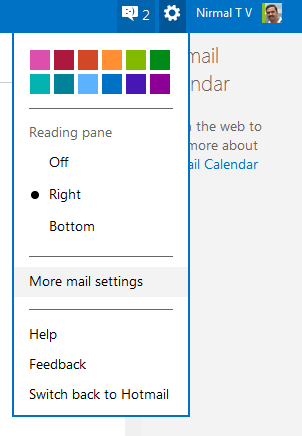
To create a signature, open the inbox and click on the settings icon on the top right corner. From the settings menu select “More mail settings”
From the mail settings, select “Message font and signature” option under the writing email. Here you can specify your email signature.
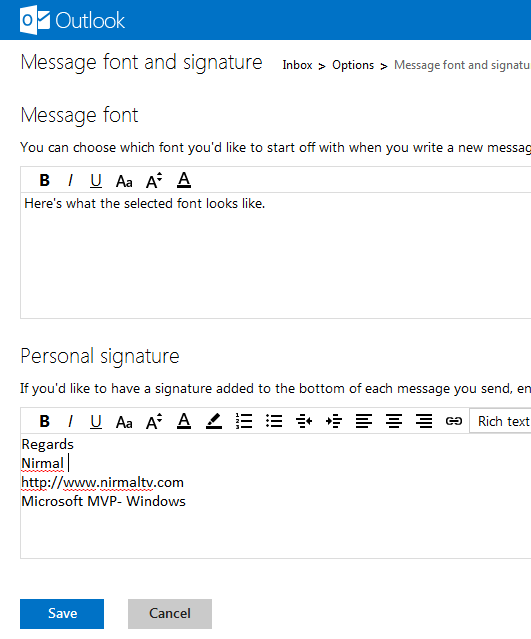
The email signature can be rich text, so you can select the formatting options including fonts, colors, alignment, links etc. Once you have create it, save it. Next time you compose a new email, you will see the signature in action.





I manage to add the signature, but when I try to compose for the new email from the outlook.com, the new added signature is not appear, is that we need to set in some where else in order to make it always appear on the compose email?
Yes, from the window where you added the signature, you need to select this signature for the email account and set it for new email and also for replies.
But how do you add an image to your signature so it still appears when the recipient receives your email?