

Have you open too many application windows on your desktop making it total chaos? In such situations it might be difficult for you to spot different apps running on your desktop. WindowsPager is a useful freeware and portable tool which lets you organize open app windows into different virtual desktops. Although there are many free tool for Windows to create multiple virtual desktops like MultiTabber, Finestra Virtual and nSpaces, WindowsPager has some useful features as well. You can quickly move any app to virtual desktop by right-clicking on the title bar or dragging the window between desktops from the mini-review in the taskbar.
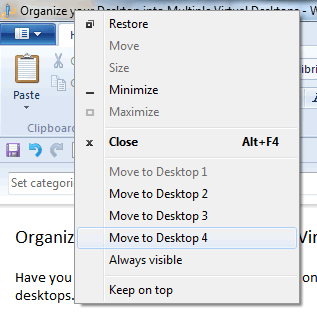
You can also drag and drop app into the taskbar, where you have 4 virtual desktops.

Features of this tool;
- Virtual desktops, workspaces for Windows Vista/7/XP/2000
- Arrange your running applications on different desktops to improve overview
- Integration into the panel
- Move windows between desktops by drag ‘n drop or by using the window menu
- Optional keyboard shortcuts for switching the desktop
- Set a window “sticky”: always visible
- “Mini-Windows” give an overview from each desktop
- Support for “Flashing-Windows”
- Keep a window above all others by selecting “Keep on top” from the window menu
- Drag `n drop between desktops
- Dual/multi monitor support
You can also keep a window as sticky which means it will be available across all desktops. WindowsPager is a pretty useful and portable virtual desktop app for Windows.







