

Windows Explorer context menu provides users with option to copy, cut or paste, but does not have an option to copy the folder path. On many occasions while sharing the folder path, you need to manually copy the path from the explorer navigation bar. Copy As URL is a simple freeware tool which when installed provides you with an option to copy the folder path as URL. Once installed, you can see an option Copy as URL in the Windows Explorer context menu.
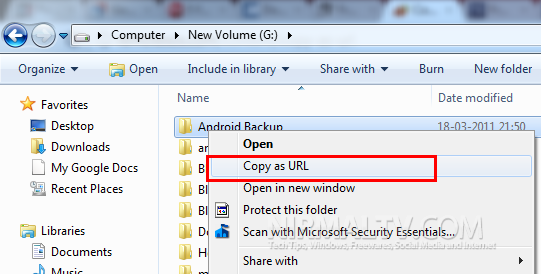
Copy As URL enhances Windows Explorer by adding context menu that when activated forms fully qualified URL link from selected file or folder. To obtain local URL path simply right-click on selected file or folder and chose “Copy As URL” menu item. The URL will be copied to clipboard and can be pasted to any text editor or application.
You must have .NET Framework 4.0 installed for CopyAsUrl to work and it works well with Windows 7.




Don’t need any software, you can do it by keep Shift button and right click > Copy as path.