

As always taking a backup of your blog at regular intervals will help you in case of any issues with the server. WordPress Backup to Dropbox is a nice plugin for WordPress which allows you to take a backup of your blog to Dropbox. It has been created to give you piece of mind that your blog is backed up on a regular basis. You can select a backup schedule for any automated backup of your blog, you can also specify the folder in Dropbox for backup.
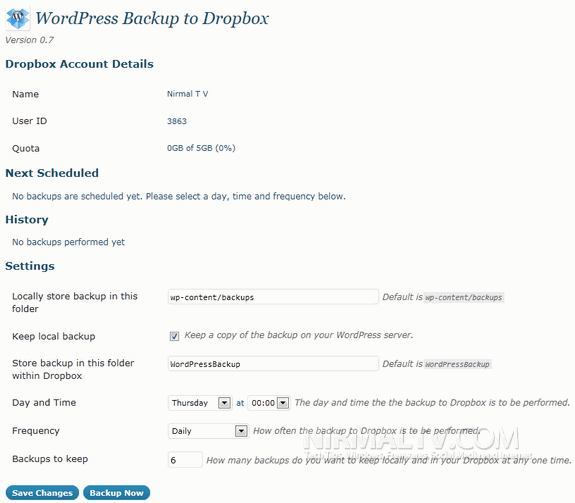
Once installed, you need to authorize the plugin to access Dropbox;
- The plugin will ask you to authorize the plugin with Dropbox.
- A new window open where Dropbox will ask you to authenticate in order allow this plugin access to your Dropbox.
- Once you have granted access to the plugin click continue to setup your backup.
You can also keep a local copy of backup on your server, you can specify the location. WordPress Backup to Dropbox is a nice backup option for all WordPress users.
Download WordPress Backup to Dropbox





I loved this going to install the plugin to by blog. lol