Hotkeys are always handy to easily open apps, folders and files and also improve productivity. Topalt Hotkeys is a freeware tool for Microsoft Outlook which allows you to create hotkeys for Outlook 2010. The advantage of Topalt Hotkeys is that it can also be used to quickly insert text apart from opening folders in Outlook.
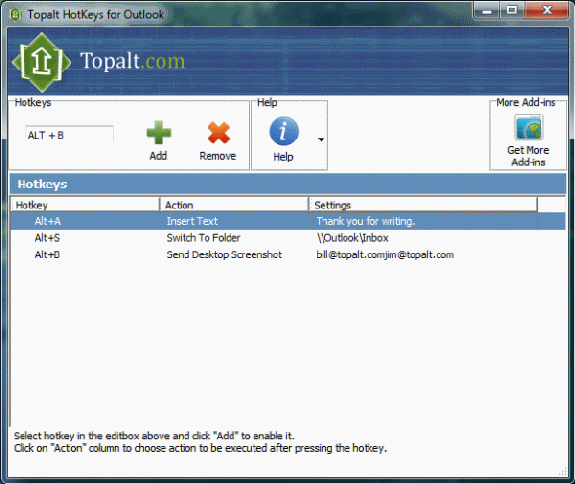
You can set the hotkeys and the action for the hotkeys and also the settings. For example as you can see from the screenshot, Alt+A will insert the text “Thank you for writing” when used in Outlook. This way you can create hotkeys are inserting signature or frequently used texts in emails.
Features of Topalt Hotkeys;
- Easy to use for beginners, powerful for advanced users.
- No complex wizard to go thru. Can be run with one mouse click.
- Can create hotkeys to insert predefined text.
- Can create hotkeys to switch to predefinded Outlook folder.
- Can create hotkeys to send desktop screenshot to predefined recipient.
- Works with all Outlook versions: 2000, 2002 (XP), 2003, 2007 and 2010 (32 bit).