

Windows Live Hotmail is the most popular web email service provider which even got better with the release of new version. Now, the Windows Live team has added more security features to Hotmail to protect your account from hijackers and phishing scams. This type of identity theft costs users and services billions of dollars every year. With the new security features added, hijackers will not be able to access the account.

To add the new security feature, open the account settings page (https://account.live.com/summarypage.aspx), you will be prompted to login with your Live ID. Here under the password reset section, you can see the new options- Mobile Phone and Trusted PC.
1. Add Mobile Phone- Adding this mobile phone number can help verify your account. Also if you forget your password, you can use this number to reset your password.
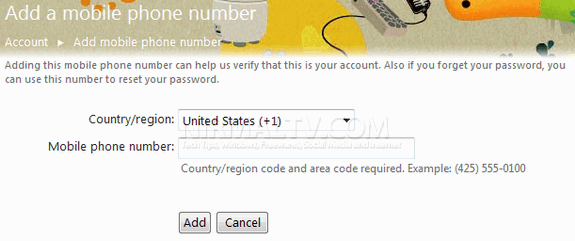
This service is not available for all countries (India is not currently listed).
2. Add Trusted PC- “Trusted PC” is a unique new proof that lets you link your Hotmail account with one or more of your personal computers. Then, if you ever need to regain control of your account by resetting your password, you simply need to be using your computer and the account will know you are the legitimate owner. This is one of the best ways to secure your account.
So if you have a Windows Live Hotmail account, make sure you have added the new security features.





What if the Trusted PC is not in the working state. Then again setting or using some other PC is not in question right!.
If the trusted PC is not in working state and you need to get the password, you can contact the WindowsLive Help center, they would be able to restore the account with your security questions.
hi ive tried to add trusted oc to my windwos live account but it keeps saying you need to installed windows live essentials which i have already got the most up to date version please help as i would like this security feature to work as i dont want anyone to hack or reset my password so with this new security feature they wont be able to do it as ive already got the cell phone feature switcded on but now its just this add trusted pc to my windows live account which aint happening at the moment please help me out thanks im running windows 7 professional 32 bit i have other email address linked to my windows live account too
It is surprising to know that there is no Indian mobile facility for the security sms in hotmail taking into consideration that Sabeer Bhatia was the creator of Hotmail.
Usually I don’t article on blogs, but I need to say that this write-up very forced me to try and do so! Thanks, very nice article.
thank you that was useful cheers