

In Windows 7, when you press CTRL+ ALT+ DEL buttons, you are presented with lots of options like Lock Computer, Switch user, change password, Log off and also start task manager. These are default settings and there is not direct interface to disable or enable these options although you can actually do these using Windows 7 registry. Tweak CTRL + ALT + DEL is a freeware tool which facilitates tweaking these options by enabling or disabling them.
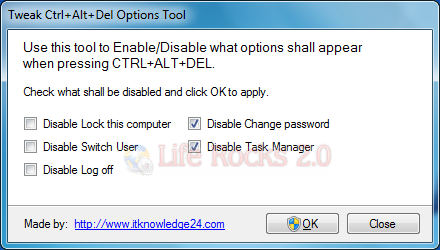
The tool provides all the five options available when you press CTRL + ALT + DEL on your Windows 7. You can disable any of these by selecting the check box against the option. When you click OK, the application changes the registry settings and disables the options.
In case you want to enable it back, uncheck the options and click OK. The application is portable and does not require any installations.
Download Tweak CTRL + ALT + DEL







