

As you you Outlook 2010 to send and receive emails, your mailbox size automatically increases. To manage the space in your mailbox or on the mail server you are using, you can move old items that are important, but rarely used, to an archive location. This process of archiving mails to another location can be done automatically with AutoArchive, where you can customize the settings.

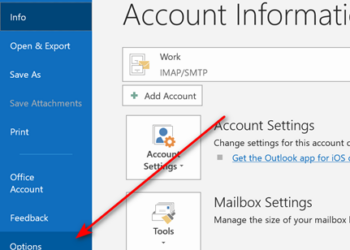
1. Click on the File Tab and select options. In the options, select the advanced tab. Here you can see the AutoArchive settings.
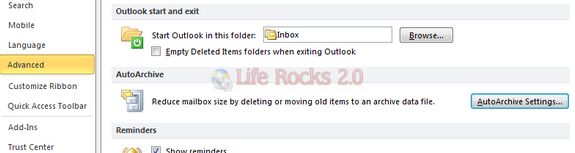
2. Click on AutoArchive Settings buttons and you can set Outlook to AutoArchive automatically after the number of days set by you. You can also specify AutoArchive to a specified folder and also specify the age of emails to archive.
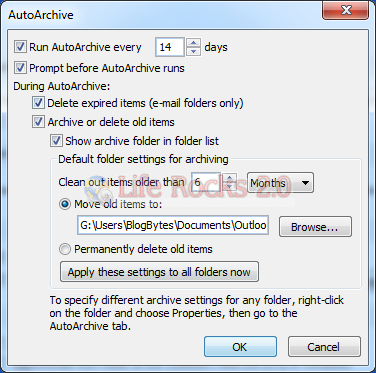
3. Once you have set the settings, you can click “Apply these settings to all folders now” to apply the settings globally.
4. If you want to AutoArchive only the Inbox or any particular folder, then select the folder or Inbox and click the Folder tab, here you can see the AutoArchive button.
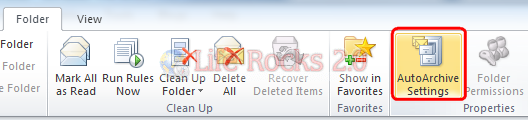
5. This will again open up the archive settings folder as shown in step 2. Once you finish with the settings, all emails in the folder selected will only be archived.
Related: How to Import and Export Rules in Outlook 2010






The info provided by you is very helpful and thank you somuch for this…..
Nirmal
Thanks for this – like all easy things it is nt always that obvious
kind regards
Rob
This info is very helpful so thank u so much.
I already used this option to archive my mail in Outlook 2010 and it is very useful. I admit though that I’m hardly using it nowadays for I installed the lookeen backup manager lately to make a backup of all my mails and settings. It’s not for free but which professional tool is free of charge?
There is no Autoarchive in my version of outlook??
You can set default auto archive settings but also overrule them on a per-folder level or via a manual archive.So i got here valuable information to fix my auto archive not working problem in 2010.
http://how-to-outlook.blogspot.in/2012/05/autoarchive-not-working-outlook-2010.html