

If you are looking for a free application to sent files to mobile phone via Bluetooth, then Files to Phone should be a perfect choice as it provides free transmission of any files (TXT, MP3, JPG, 3GP, MP4, vCal, vCard) to any Bluetooth devices (mobile phones, smart phones, hand-held devices, communicators, laptops, mini-laptop computers) within coverage over Bluetooth. With this free application, you can sent files from your PC to any Bluetooth enabled device.
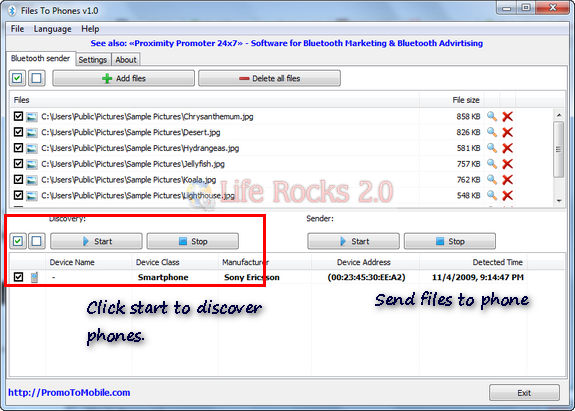
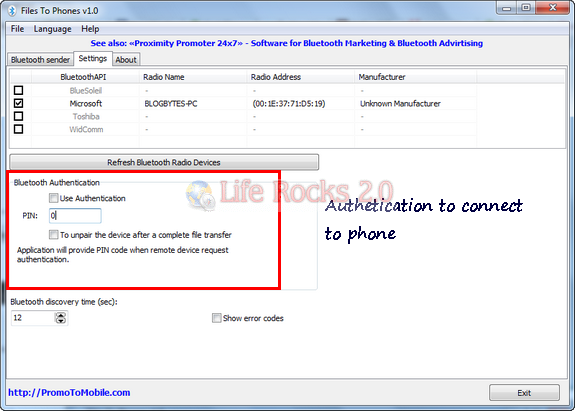
Once you have turned on the Bluetooth on both the devices, you can start pairing using the Start button on the left hand side. Once connected, it shows the details of the device connected. Add files to the interface, select the files and then start transfer to the device. You can use Bluetooth authentication to pair the device with your own pass code and also unpair it after the transfer is complete.
The application is free for personal use, but the free version has a pop up every time you open the application. If this setting is not much of concern, Files to Phone is a very good app to transfer files from PC to phones.







THANK YOUUUU!!! 🙂
I was searching for this for a long time!! 😉
Thank You Very Much Nirmal!!
Gretting from Portugal!!