

We have previously covered many free software for CD and DVD Burning for Windows. UsefulUtils Discs Studio is another free application for burning data CD, audio CD and DVD videos. This free tool works on all 32 bit versions of Windows including Windows 7. The tool provides you with lots of options and features for burning and yet is very light on system. It also provides you with features like On-The-Fly burning, PerformOPC, Over-burning, Test burning, Buffer Underrun Protection, various burning modes, bootable discs.
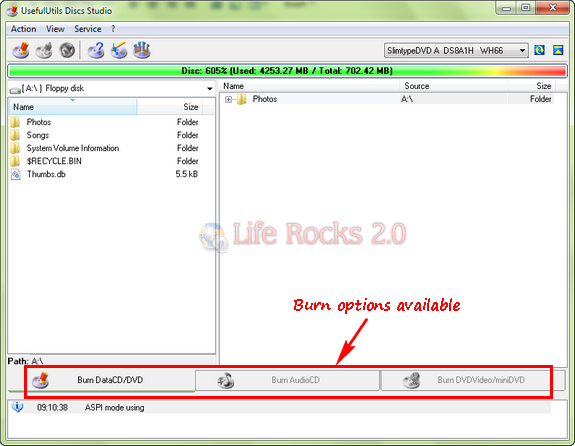
Features of UsefulUtils Discs Studio;
- SCSI, ATAPI, Parallel port, USB (1.1 and 2.0) and FireWire (IEEE 1394) devices support;
- ASPI, SPTI, SPTD interfaces support;
- Burning on any discs support;
- “On-The-Fly” burning support;
- PerformOPC support;
- OverBurning (in UUDS – HyperBurning) support;
- Test burning support;
- Supported BUP (Buffer Underrun Protection):
- Bootable discs burning;
- Multisessional discs burning with a choice of any imported session;
- Burning of multiple disc copies;
- Verifing burning information;
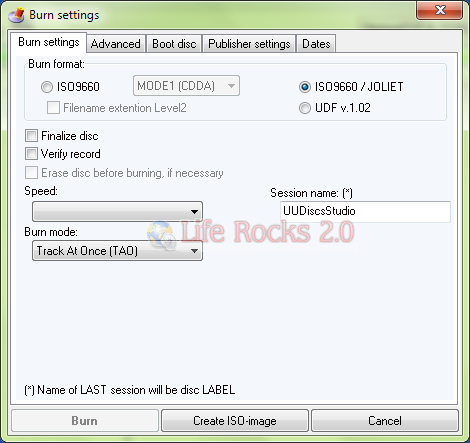
Overall UsefulUtils Discs Studio is a good free tool with great features and options for CD and DVD burning.
Download UsefulUtils Discs Studio







Trend flags this as a virus.
It’s truly a nice and useful piece of information. I’m satisfied that you shared this helpful info with us. Please keep us up to date like this. Thank you for sharing.