

PDF has become one of the most commonly used document format. There are many instances where we need to encrypt or decrypt PDF, merge or split PDF and also do other changes to PDF documents. We have previously covered a free utility called PDF Tools which does management of PDF files. Here is another free tool, Pdftk (PDF Tool Kit) which does functions like Merge PDF, Split PDF Pages into a New Document, Rotate PDF Pages, Decrypt PDF, Encrypt PDF and also watermark PDF files. Unlike other free PDF tools, this is quite a different utility and provides a command line interface for all functions.
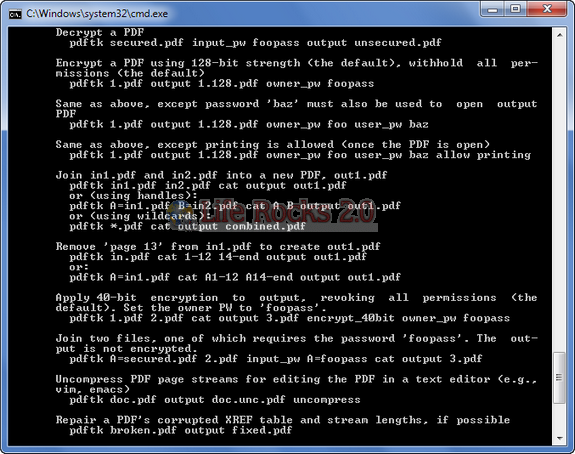
To use this utility, download and unzip the file. Move the resulting pdftk.exe to a convenient location, such as C:windowssystem32. Open a command prompt and type pdftk --help. You should get the above documentation.
Features of Pdftk;
- Merge PDF Documents
- Split PDF Pages into a New Document
- Rotate PDF Pages or Documents
- Decrypt Input as Necessary (Password Required)
- Encrypt Output as Desired
- Fill PDF Forms with FDF Data or XFDF Data and/or Flatten Forms
- Apply a Background Watermark or a Foreground Stamp
- Report on PDF Metrics such as Metadata, Bookmarks, and Page Labels
- Update PDF Metadata
- Attach Files to PDF Pages or the PDF Document
- Unpack PDF Attachments
- Burst a PDF Document into Single Pages
- Uncompress and Re-Compress Page Streams
- Repair Corrupted PDF (Where Possible)
Pdftk allows you to manipulate PDF easily and freely. It does not require Acrobat, and it runs on Windows, Linux, Mac OS X, FreeBSD and Solaris.







Informative,
A very useful tool
Thanks
I found a nice tool to join pdf files.
http://watermark-images.com/join-pdf-documents.aspx
Is this tool compatible with Windows 7?