

Creating a WordPress theme needs lot of programming and it definitely is not an easy task. If you are a designer and having good Photoshop skills, you can now create WordPress themes from your PSD files. Divine is a free tool which is a plug-in for the Photoshop and can create a WordPress theme from the Photoshop PSD files. The WordPress theme created by this tool is XHTML and CSS valid and will be widget ready and has cross browser compatibility.
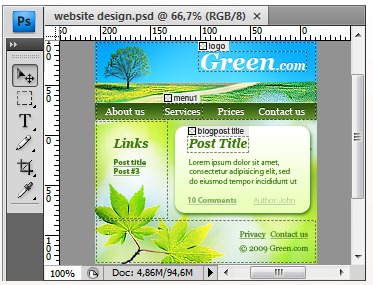
Once installed, the plugin will be available in Photoshop and you can launch the PSD file for creating theme from inside Photoshop. This plugin works with Windows XP, Vista and Windows 7 and is compatible with Photoshop CS3 and CS4 32 bit.
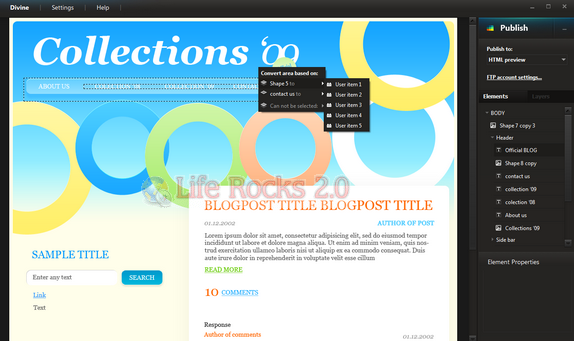
The final version is not yet ready, so the current free version has some restriction on the resolution of the template, images should be GIF format, the template can be converted only to WordPress etc. There are tutorials on how to start using the plugin which can be found here.
Features of Divine;
- HTML page identical to your PSD design
- Clean standard compliant HTML-CSS layout
- No HTML, CSS or programming knowledge required
- Easy publishing from Photoshop® to your WordPress website
- Built in FTP-client
- Widget ready WordPress theme as output
- Generate unlimited WordPress themes
- Supports all Photoshop filters
- Supports all Photoshop layer blending options, layer effects, masks etc.
- Supports smart objects and layer groups
- Resulting HTML/PHP code is div-based
- Cross browser HTML / CSS code
- Encoding support
Divine is a great software especially for designers who can now convert their quality designs to WordPress themes easily. When the final version is released there would be paid versions without any restrictions.



Hey very nice blog!!….I’m an instant fan, I have bookmarked you and I’ll be checking back on a regular….See ya
Thank you for your comments and interest in Divine project.
We are still trying our best on improving functionality of the plugin and have added plenty of new features, which haven’t been used in Free Edition, to Divine Personal one. The release of this edition will happen in the second quarter of 2010. The closed beta testing has already started. However, take it easy, the public beta version will be available soon. You’ll have a chance to get your hands on it. More details at our official site: http://www.divine-project.com/.
By the way, be up on the plugin development at http://divine.ideastrunk.com/.
Today we are happy to announce about release of completely new web service called Ideastrunk created by Divine team for everyone: customers and developers to make a problem solving easier and quicker, to create high-quality products and implement new ideas with the help and advice of professionals. It’s friendly environment, and you can try it right now enjoying its advantages and possibilities.
Why Ideastrunk? It offers you:
1) An information and assistance resource.
2) Total control for implementation or improvement of web projects.
3) Time to focus on your core activity.
4) All kind of support any time.
5) Clients.
So you need not go on surfing the Internet for a suitable, inexpensive, online service to find answers to questions appeared sometimes every day or even hour. Ideastrunk is really simple and free. More details at: http://ideas-trunk.ideastrunk.com/
Thank you for your interest in Divine project.
With addition of unique features, and implementation of many suggestions of our users, the release date of Divine Elemente (formerly Divine Personal) will be announced this summer. New Name – New Possibilities.
More details at our official website: http://www.divine-project.com/blog-news.
Good news! Now you have a chance to try yourself in Divine Elemente Edition (formerly Divine Personal one). You’ll find new functionality of this edition testing all interesting features of Divine plugin.
So, beta testing has already started. Want to join? More details at: http://bit.ly/asuew3
I liked layout editor very much!!!
When I saw this plugin, I was doubtful whether it can do what it’s said. But it was firstly. Then I registered and gave a try to its beta. Interesting plugin.
Ohhh, I’ve never heard about this stuff before!
It’s interesting…
Nice But I want a software which will be a converter not like a plugin.
According to your instructions, I was able to create a theme in WordPress.