

We have covered some of the features available in the new Office 2010, which in fact is packed with new features and improvements over the previous Office 2007. Word can be used as a blogging tool and this feature was available in Word 2007 as well, but Word 2010 has improved interface, features and also more editing options including the new screenshot feature available in Word 2010. Although there arent much changes in setting up a blog with Word 2010 when compared to Word 2007, we will still cover the complete steps on how to set up blogging with Word 2010.
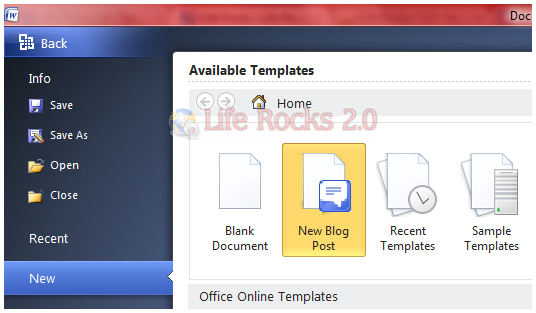
1. To start setting up the blog, click on the office button and select the New tab in the office menu. In the New menu, select New Blog Post and click Create.
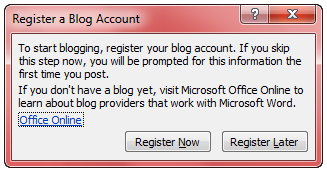
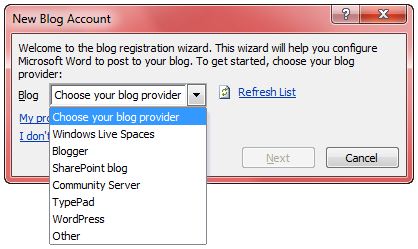
2. This will ask you to register for a blog account, click on the register now button. You need to select the blogging service provider and enter your login credetials.
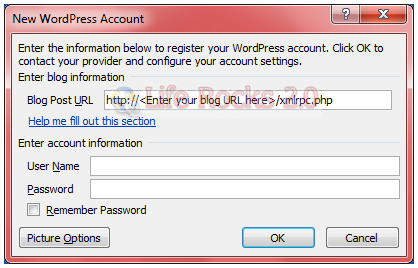
3. Once your login details are validated, you can start blogging. Your categories are available in the Word. The advantage of using Word 2010 is that you get better options in formatting your post before publishing.
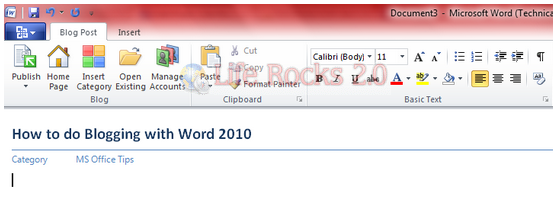
The insert tab has the screenshot option which can be used to take screenshots for your blog articles.

NB: This article was written and published using Word 2010.





Any thoughts on how this stacks up compared to Live Writer after giving it a try? I’ve been very pleased with Live Writer (though it hasn’t inspired me to finish any blog posts lately!) I’m eagerly awaiting the 2010 experience!
@Alex,
The main feature of Word 2010 as blogging tool is the formatting options which is not available in WLW. But WLW also has additional features like tags, so it based on your usage that you can decide which is better.
One again, your articles is very good.thank you!very much.
I’m having difficulty using Word 2010’s blogger option to upload a blog post with image. Text works like a charm, but I can’t find the correct settings to upload an image. The application asks for upload and source URls; however, Word allows you to insert inline images. That is, they appear in the post in Word, but they don’t upload to my Blogger blog. Any thoughts. Microsoft’s documentation on this is circuitous and unhelpful.
Jeff, I got the same problem. Blogging text by using Word 2010 ain’t a problem, but I also cannot find the correct settings to upload images. Even if I upload the pictures to a picasa web album. Maybe it doesn’t work with Blogger at all?