

WinBubbles, a free tweaking program for Windows Vista, has now released a new lite 2009 version which supports Windows 7. The program has updated and can be used for tweaking Windows 7 including the OEM and Owner information. Apart from this the tweaker can also apply restrictions on your Windows 7 machines, add options to right click context menu, change UAC settings and also customize screensaver in Windows 7. Note: Please read the author information carefully before applying any tweaks.
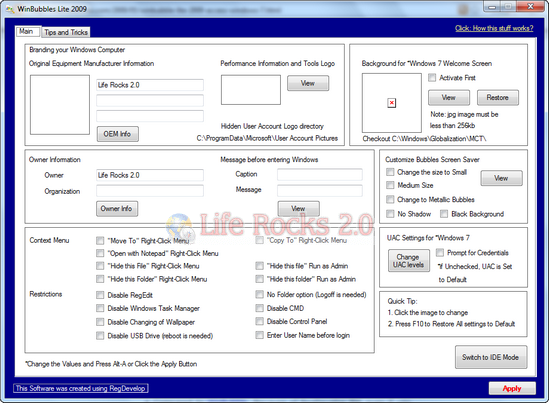
Features
- Add or Change Original Manufacturers logo and information
- Separately Customize the Performance Information and Tools Logo
- Change or Customize the Background of Windows 7 Welcome Screen
- Change the Owner Information
- Add Message before logon
- Customize Bubbles Screen Saver – Change to small/Medium size, Metallic Bubbles, remove the shadow and launch in a Black Background.
- Add “Move To” and “Copy To” Right-Click Menu
- “Opened with Notepad” Context/Right-Click Menu
- “Hide this file” and “Hide this Folder” Right-Click Menu – Standard and Run as Admin is included
- No Folder Option (Logoff is needed in Windows 7)
- Disable Regedit
- Disable CMD.exe
- Disable Windows Task Manager
- Disable Changing of Wallpaper
- Disable Control Panel
- Disable USB Drive in Windows 7 (Reboot is needed) and Vista
- Disable Control Panel
- Enter Username before login
- Changing UAC levels launcher and Change the settings to “Prompt for credentials”







