

Microsoft Office 2007 SP2 which was released yesterday has lots of improvements changes and also new features added. The SP2 is around 290MB in size and brings in some great features, Open Document and PDF creation being one of them. Once you have installed SP2 on your Office 2007, you can start creating PDF files directly from Word 2007 without having to install any Add-on or third party application. You can download Office 2007 SP2 from here.
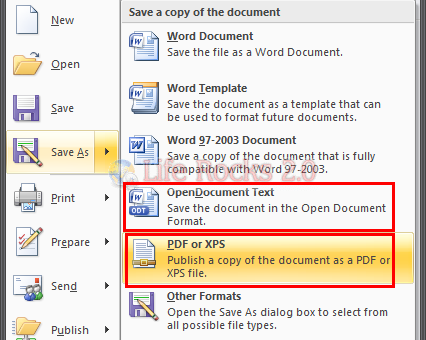
Once SP2 is installed, to save a document in PDF or OpenDocument text, click on the office button on the top left corner and select Save As. You can see two new options added by this package.
Office 2007 SP2 also brings in other features and improvements, so we recommend you to install the SP2.





this feature was previously present as an addon
http://www.ulhas.net/2008/09/save-as-pdf-or-xps_30.html
There is a nifty Word addin that automates the labeling and branding of Word documents at the time the PDF is created. Well worth checking out. StampIt for Word
You should install askimet on your blog, most of the comments here are spam.