

Internet Text Speaker is a freeware utility which can speak any selected text from any website. Internet Text Speaker once installed will integrates itself to the Internet Explorer and Firefox context menu i.e. the right click menu. Whenever you want to listen to any text on the website, select the text and then right click and choose Speak Text option.
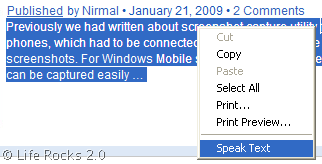
Once you select Speak Text from the options, a small window will open and start reading the text you have selected. You can change the settings, you can adjust the volume, read rate, voice etc.

You also have the option to replay the text or pause the speaker in case you need it. Internet Text Speaker is a smart choice if you want a speaker for reading webpages to you.
Download Internet Text Speaker








Given the recent decision by Amazon to cave to the Authors Guild regarding the text-to-speech feature in the Kindle2, I wonder whether applications like this will be next to be attacked by writers and the publishing industry.
After all, this tool is designed to create unlicensed derivative works…