

Open in Google Docs is a Firefox add-on which will upload, save, edit and share html, htm, pdf, xls, doc, ppt, csv, txt, rtf, odt, sxw, pps and ods using Google Docs with just one click. The add-on will add a menu to the Firefox right click menu. If you want to open any document, ppt or other file with Google Docs, right click on the file and select “Open in Google Docs”.
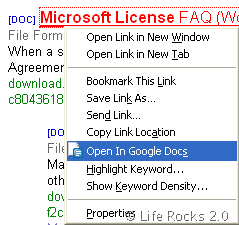
When you select Open in Google Docs, the add-on will upload the document/file to your Google Docs account and you can quickly start editing it. You need to log into your Google Account to automatically upload, otherwise it will redirect to login page.
While the document is being uploaded in the background (upload time may vary depending on the file size, response time of the server, and you connection speed) you can carry out other tasks and when upload is finished a new tab opens and shows you the document you loaded up.
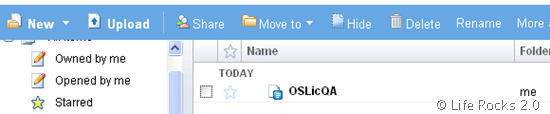
Supported file formats for this add-on are html, htm, pdf, xls, doc, ppt, csv, txt, rtf, odt, sxw, pps and ods. This add-on is helpful for people who use Google Docs for all document editing. This add-on is an experimental one, so you need to login to download it.
Download Open in Google Docs Add-on




This add-on is really cool for Google Docs lovers.
I don’t know why this didn’t worked for me 🙁
well, I have got another very cool (& working) Add-on “Open IT online” which supports GDocs, ThinkFree, Zoho etc.
🙂
This tool is very nice, problem is you can only use it in firefox.
You guys might be interested in this new tool, GDocsOpen, which opens a local document using Google Docs, just like any other office suite will.
There’s a full-feature trial available also: http://gdocsopen.com/download.aspx