
Disable Startup is a free startup manager for Windows which is also a monitoring program. This application can scan all Windows startup programs on your computer, and monitor all new startup items, helps you control, manage and optimize Windows startup configuration. This free application works fine Windows XP and Vista. This utility is useful if you install lot of free applications and all these are started on Windows start up.
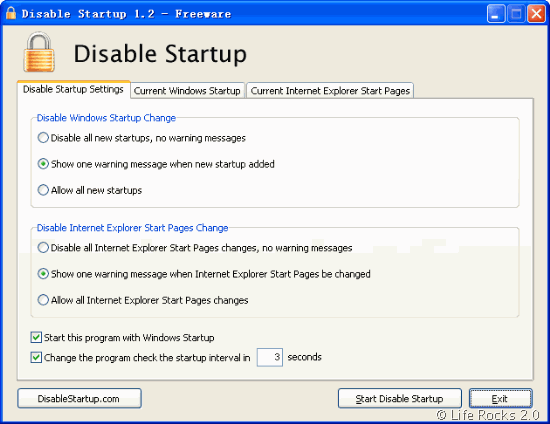
The application has pretty simple interface which is divided into three tabs. The first tab has the disable startup settings, the second one shows the current start up applications and the third one is to change the IE home page and start up pages.
This software can help you save system memory and resources by disabling unnecessary programs. Disable Startup also monitor the start page of Internet Explorer and stop any change that you might not be aware of.
Disable Startup help you disable unwanted startup applications quickly and easy, keep a constant eye on your system’s startup entries and IE start pages, When ever a change is made, you will be notified and given a choice to either allow the change or not to change.









[...] At its core, Disable Startup is a startup manager similar to the built-in Windows System Configuration Utility. It does the trick if you just want to use it for that, but it’s really nothing special strictly as a startup manager. If you’re willing to run Disable Startup in your system tray (which will cost you about 4MB), it’ll closely monitor your startup applications for new additions. The app gives you the option to disable all new startup entries, warn you when new startup apps are added, or allow any new additions. Likewise, Disable Startup can prevent new software installations from changing your IE start page. It may not be worth the added system tray app for some, but if you install a lot of software that ends up sneaking entry after entry into your list of startup apps, this simple utility is perfect. Disable Startup is a free download, Windows only. Disable Startup [via Life Rocks 2.0] [...]
[...] Life Rocks 2.0Per supporto tecnico sugli articoli, problemi con il computer e altro, scrivi sul forum Iscriviti ai [...]
[...] At its core, Disable Startup is a startup manager similar to the built-in Windows System Configuration Utility. It does the trick if you just want to use it for that, but it’s really nothing special strictly as a startup manager. If you’re willing to run Disable Startup in your system tray (which will cost you about 4MB), it’ll closely monitor your startup applications for new additions. The app gives you the option to disable all new startup entries, warn you when new startup apps are added, or allow any new additions. Likewise, Disable Startup can prevent new software installations from changing your IE start page. It may not be worth the added system tray app for some, but if you install a lot of software that ends up sneaking entry after entry into your list of startup apps, this simple utility is perfect. Disable Startup is a free download, Windows only. Disable Startup [via Life Rocks 2.0] [...]
[...] [Via] [...]
[...] Disable Startup Stops Unwanted Apps from Creating Startup Entries Windows only: Free application Disable Startup keeps just any old app from adding itself to your list of startup applications, keeping your boot time snappy and RAM happy. Disable Startup [via Life Rocks 2.0] [...]
[...] simple utility is perfect. Disable Startup is a free download, Windows only. Disable Startup [via Life Rocks 2.0] Tags: Downloads, windows [...]
[...] Descarga: Disable Startup (visto en Lifehacker > Life Rocks 2.0) [...]
[...] At its core, Disable Startup is a startup manager similar to the built-in Windows System Configuration Utility. It does the trick if you just want to use it for that, but it’s really nothing special strictly as a startup manager. If you’re willing to run Disable Startup in your system tray (which will cost you about 4MB), it’ll closely monitor your startup applications for new additions. The app gives you the option to disable all new startup entries, warn you when new startup apps are added, or allow any new additions. Likewise, Disable Startup can prevent new software installations from changing your IE start page. It may not be worth the added system tray app for some, but if you install a lot of software that ends up sneaking entry after entry into your list of startup apps, this simple utility is perfect. Disable Startup is a free download, Windows only. Disable Startup [via Life Rocks 2.0] [...]