

By default, Windows Live Messenger allows only a single user to be signed in and running the messenger client per computer. A second user under the same Windows account will not be able to log in to Windows Live Messenger using another ID, as long as the instant messaging client is in its default configuration. This can be changed using a registry hack which will allow any number of instances of Windows Live Messenger.
NB: Please take a back up of registry before modifying it.
1. To Change the default settings, Click Start-> Run-> Regedit and this opens the registry editor.
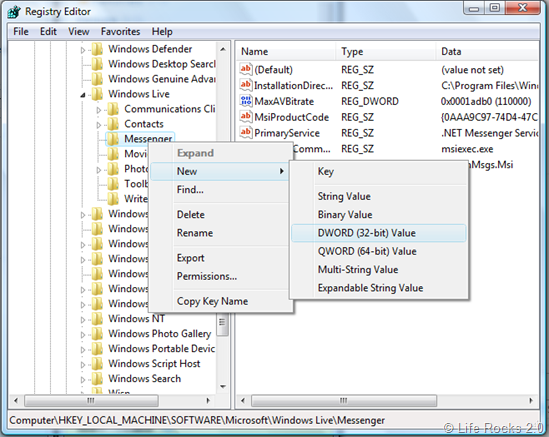
2. Navigate to HKEY_LOCAL_MACHINE-> SOFTWARE-> Microsoft-> Windows Live. Right click on the Messenger and select New-> DWORD (32 bit).
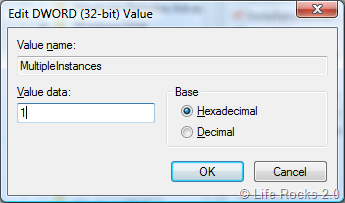
3. Enter the name of the new DWORD as MultipleInstances and value of this key as 1. Click OK and close the registry editor.
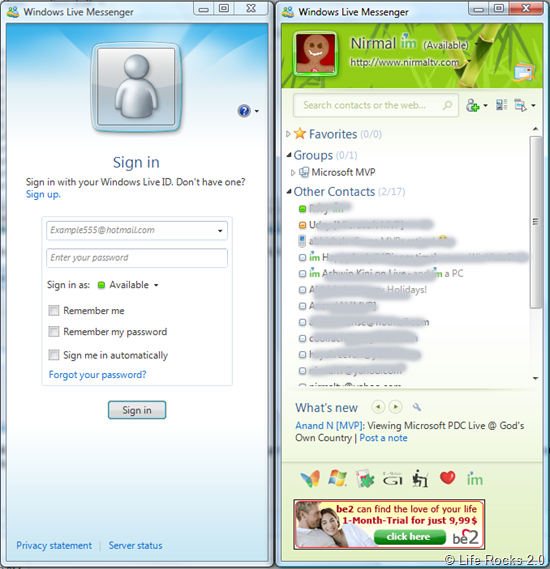
This registry hack will allow for multiple instances of Windows Live Messenger 9.0 (2009) to run simultaneously on the same computer. This hack will not allow multiple instances of Windows Live with the same Live ID.
In any case you want to remove this hack, then delete the registry entry. Thanks LiveSide for this tip.






wow nice job .. it really works perfect.. but some times u need to install new windows messenger as u can’t run the old one with this..
thank you ..
WORKS PERFECT!!!
THANK U
very simple instructions..
easy to follow..
nice work!!!
and thanks of course..
thank you it work 10\10
Good job ^_~
i follow the instractions and did every thing but its not work with me ebven iam using msn 2009 , i donot know why , pls help me in that , thanks
nice work……..thanks for sharing.same way we can do for yahoo messenger.
http://freecomputercourses.blogspot.com/
nice dear it loooks very well thx
Unique share
yeah thanks it works!!! 🙂 100/100
Wao yar Thanx alot….
does work the 2011 version of messenger?