
If you are watching movie or listening to your favorite songs, then sometimes Windows sounds could be annoying in between. SoundOff is small freeware utility that lets you quickly and easily turn off Windows sounds with the right-click of a mouse button. Generally to turn off Windows sounds, you have to go to the control panel, select the Sounds and Multimedia applet, select the Sounds tab, then change to No Sounds. This utility make turning off Windows sounds easier by running in the notification area.
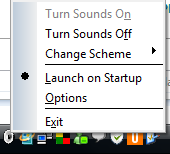
You can easily turn off the Windows sounds by right clicking the icon and selecting Turn Sounds Off option.
In addition, this program lets you rename and delete your added sounds schemes. It also has an option to make sure your current sound scheme stays that way, as some other programs will change your sound scheme without you knowing.









[...] details: Turn off Windows Sounds Easily [...]
[...] About us SoundOff Stops Windows Sounds from Interrupting Music [Featured Windows Download] Monday, November 24th, 2008 @ 9:30 am | Author: admin Windows only: Turn off Windows clinks and clanks while you click around your computer in one shot using the simple SoundOff utility. When you want to listen to music without hearing the sounds of your operating system, click the SoundOff system tray icon to switch Windows’ sound scheme or turn Windows sounds on or off. Of course SoundOff’s only useful if this is something you do often; otherwise you can hit up Control Panel, go to the Sounds and Multimedia applet, select the Sounds tab, then change to No Sounds. SoundOff is a free download for Windows. SoundOff [via Life Rocks 2.0] [...]
[...] Windows only: Turn off Windows clinks and clanks while you click around your computer in one shot using the simple SoundOff utility. When you want to listen to music without hearing the sounds of your operating system, click the SoundOff system tray icon to switch Windows’ sound scheme or turn Windows sounds on or off. Of course SoundOff’s only useful if this is something you do often; otherwise you can hit up Control Panel, go to the Sounds and Multimedia applet, select the Sounds tab, then change to No Sounds. SoundOff is a free download for Windows. SoundOff [via Life Rocks 2.0] [...]
[...] Windows only: Turn off Windows clinks and clanks while you click around your computer in one shot using the simple SoundOff utility. When you want to listen to music without hearing the sounds of your operating system, click the SoundOff system tray icon to switch Windows’ sound scheme or turn Windows sounds on or off. Of course SoundOff’s only useful if this is something you do often; otherwise you can hit up Control Panel, go to the Sounds and Multimedia applet, select the Sounds tab, then change to No Sounds. SoundOff is a free download for Windows. SoundOff [via Life Rocks 2.0] [...]
[...] SoundOff Stops Windows Sounds from Interrupting Music [Featured Windows Download] Posted by news on Monday, November 24, 2008, 8:40 This news item was posted in Technology category and has 0 Comments so far. Windows only: Turn off Windows clinks and clanks while you click around your computer in one shot using the simple SoundOff utility. When you want to listen to music without hearing the sounds of your operating system, click the SoundOff system tray icon to switch Windows’ sound scheme or turn Windows sounds on or off. Of course SoundOff’s only useful if this is something you do often; otherwise you can hit up Control Panel, go to the Sounds and Multimedia applet, select the Sounds tab, then change to No Sounds. SoundOff is a free download for Windows. SoundOff [via Life Rocks 2.0] [...]
[...] About us SoundOff Stops Windows Sounds from Interrupting Music [Featured Windows Download] Monday, November 24th, 2008 @ 6:30 pm | Author: admin Windows only: Turn off Windows clinks and clanks while you click around your computer in one shot using the simple SoundOff utility. When you want to listen to music without hearing the sounds of your operating system, click the SoundOff system tray icon to switch Windows’ sound scheme or turn Windows sounds on or off. Of course SoundOff’s only useful if this is something you do often; otherwise you can hit up Control Panel, go to the Sounds and Multimedia applet, select the Sounds tab, then change to No Sounds. SoundOff is a free download for Windows. SoundOff [via Life Rocks 2.0] [...]
[...] SoundOff [via Life Rocks] Tags: freeware, Manage Windows Sounds, SoundOff, utilities, Windows Sound Manager, Windows [...]
[...] Vía | Life Rocks 2.0 [...]
[...] sie bei einem ubbedachten Klick die Musik einfach mal infiltrieren. Doch es gibt Abhilfe. Und zwar hier. Mit “soundoff” kann man relativ unkompliziert alle Störgeräusche abschalten [...]