

To ensure the integrity of document, you can consider adding a digital signature to Word documents. The digital signature will be invisible and will not allow to edit the document making it locked. The locked document can be unlocked, but doing this will make the digital signature invalid. So this process ensures that your document is not tampered with.
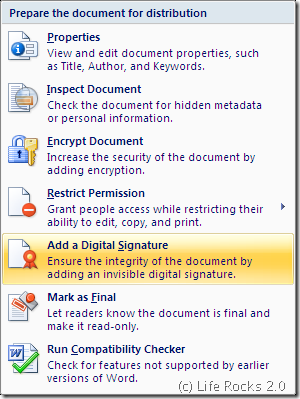
To add a digital signature, click on the Office button on the top left corner of word and select Prepare. Inside Prepare menu, select Add a Digital signature option.
Once the option is selected, you get a warning and here you can either get digital signature from 3rd party or use the default one from Microsoft. The default one does not provide any warranty as it has legal enforceability in different countries.
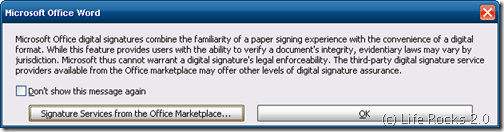
Click on OK to select the default signature. If the document is not saved, then it prompts to save the document. Next you can add the purpose of signing the document.
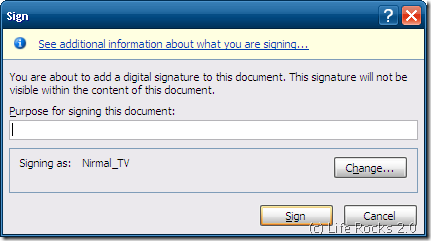
Click Sign button and the signature will be created. You can view the digital signature from the same menu (Prepare-> View Digital Signatures). This will be available as a sidebar.
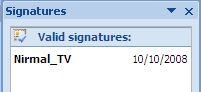
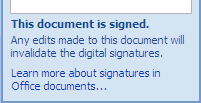
If any edits are made to the document, then the signature will become invalid.






I never knew this feature was in Word 2007
That’s a very nice share…. I never knew about that before…
Is there a way to add a digitla signature for older versions of office?? coz I use an older version…
Thanks..good article
I followed the above steps and got a “Smart Card” error. After hitting “Sign” in the second last screenshot, I got a smart card error “Your signature could not be added to the document. If your signature requires a smart card, ensure that your card reader is installed correctly”. How do I know if my signature requires a smart card or no?
Thanks!
After hitting sign in the second last screenshot, I received a Smart Card error “Your signature could not be added to the document. If your signature requires a smart card, ensure that your card reader is installed correctly”. How do I know if I need a smart card or no?
Yes, digital signature technology is very safe and easy i also used it and i am 100% satisfy with digital signature technology. It is very much advance and safe.
I’m experimenting with digital signatures, but they’re only useful for my purposes if I can format the text that appears below the signature line – that is, the signer’s name/title. I need to include the title “CFP®”, but the ® needs to be in superscript. Is this possible? If so, how’s it done?
Just to share what I have discovered:
This feature is also available in Word 2003: Tools -> Options -> Security -> Digital Signatures.
However, 2003 signatures do not allow you to enter a “purpose” for the signature.
Further, a document signed in Word 2003 can be further signed in Word 2007 with no problems when read again in Word 2003 (i.e, both signatures are signed 2003-style).
However, if a document is initially signed in Word 2007, the signature cannot be seen in 2003 (because it is signed 2007-style).
There is a nifty program that is an add-in to Word that automates document identifcation and marking as well as adding graphic signatures. Check out http://www.stampit4word.com. It completely eliminates the need for rubber stamps for document marking.
I was looking for how to add electronic handwritten signatures to Word.
Scan your signature and save it as a jpg, gif, etc.
You may need to crop it.
Insert signature into Word as a “picture”.
2 or 3 steps are all you need to do.
its very easy way to add digital sign.in ms office 2007,,,,,,,,,,,,,,,,,,,thanks
Thank you its working
yes it is very easy and nice technology and is also useful.
Thanks for the steps. I have a question. I believe that the signature will become invalid when the certificate used to sign expires. With Code Signing there is a concept of Time Stamping which ensures the sign is valid even after the certificate expires. I was wondering if while adding digital signature it can be time stamped so the signature is valid life long. That I think is required as documents most probably get archived and are there to stay for sure past the expiry date of the actual certificate. Any suggestions?