

One of the most commonly encountered issue while deleting files or folders in Windows is “Error Deleting File or Folder”. This could be because of various problems like folder could be in use or some malware could be the reason for it. Free Unlocker is a useful utility which helps to delete files or folders locked by Windows.
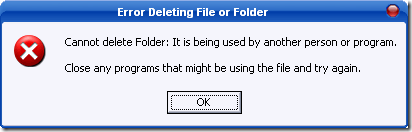
Other forms of error which can be solved by this utility are
- Cannot delete file: Access is denied
- There has been a sharing violation.
- The source or destination file may be in use.
- The file is in use by another program or user.
- Make sure the disk is not full or write-protected and that the file is not currently in use.
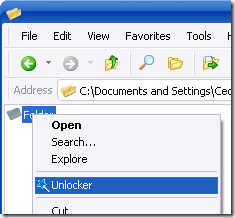
Once installed, Unlocker comes up whenever Windows refuses to delete, move or rename a file. Alternatively you can also launch it from the Windows context menu. Right click on the folder and select Unlocker.
Unlocker is a utility which will come handy many times while deleting, moving or renaming folders. Unlocker is completly free of cost and is supported on Windows Vista as well.








I had this problem before. Sometimes when a program crashed, eventhough I have removed the program, I can’t delete the folder. Hopefully this program will help.
I hope this is not a virus spreading or malware spreading software. I suggest there must be some source code for this software too.
Hahahaha, bela tentativa
vírus *fail*