

Windows Policy allows you to display information about the previous user logons and logon failures to the user. This enables you to check unauthorized access to your PC. This setting can be enabled using the Group Policy Editor. Group Policy Editor is available only in Windows Vista Ultimate and Enterprise version.
1. To enable this setting, Start-> Run-> gpedit.msc.
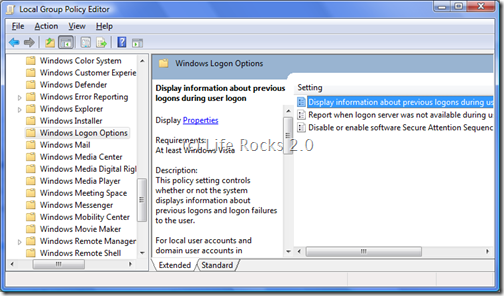
2. Navigate to Computer Configuration-> Administrative templates-> Windows Components-> Windows Logon Options. Double click the first option on the right side- “Display Information about previous logons during user logon”.
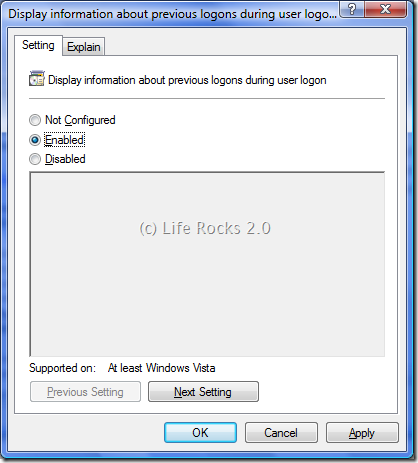
Enable the option and click OK. When this option is enabled, a message appears displaying the last logon attempted along with the user name and also the number of unsuccessful attempts on your PC.



This Is Really Cool..
Was not Knowing ABout This…
Thnx Nirmal…
– Anurag R.C.
http://www.pcdrome.com
Latest Post:
http://www.pcdrome.com/2008/09/use-memokeys-and-save-your-time/
Though I don’t really allow people to touch my laptop when I am at home, this would definitely help me figure if there were any sneaky attempts to login behind my back 🙂