
Advertisements

Microsoft Pro Photo Tools is a freeware application which provides set of tools for editing the meta data of photos. The current version enables you to quickly geotag your photos, view and edit metadata, and more, leveraging the power of Windows and Microsoft Live Local. Pro Photo tools is mainly perform various tasks with their images-including RAW captures.
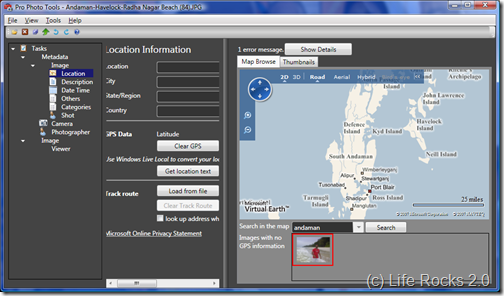
Pro Photo Tools

Feature of Pro Photo Tools;

  • Geotagging- With Pro Photo Tools, you can gather location information from a variety of sources and apply it to the metadata in your image so that it is easy to identify the location of the image.
  • Determine Location- With Pro Photo tools, you can automatically apply the actual name of the location where a photo was taken based on the GPS coordinates.
  • Assign GPS Coordinates- From the location details, you can apply the GPS co-ordinates to the images.
  • Identify location on a map- You can tag the photo with location information based on a specific position on the map.
  • View images on a map- Pro Photo Tools utilizes Windows Live Local to display your images on a map of the world, including the ability to view your images on a normal map or a satellite view of the world.
  • Edit image metadata- You can now update a wide range of metadata for your images using Pro Photo Tools, and that metadata gets stored in the actual image file, so wherever your photo goes, your data goes.
  • RAW support- By leveraging the Windows Imaging Components (WIC), this is able to provide support for any RAW file format (in addition to TIFF and JPEG) for which a codec has been developed.


Download Pro Photo Tools


6 Responses to “Edit Metadata of Photos with Microsoft Pro Photo Tools Freeware”

  1. arnansy says:

    Thanks for the suggestion
    http://www.izlekop

  2. [...] Windows only: Microsoft Pro Photo Tools is a full-featured metadata editor for your digital photographs. The app supports pictures saved in RAW format along with JPEG and TIFF, and editing your metadata works the same no matter what your default file type is. Apart from extensive run of the mill metadata editing, Microsoft Pro Photo Tools’ marquee feature is geotagging, which can add location information to your photos in a number of ways. Once geotagged, you can view any of your images on a Windows Live map. Microsoft Pro Photo Tools is freeware, requires .NET 3.0 and Windows validation (blech). If you’ve already got a favorite metadata editor for your photos, let’s hear about it in the comments. Microsoft Pro Photo Tools [Microsoft via Life Rocks 2.0] [...]

  3. [...] Microsoft Pro Photo Tools | Vía: Life Rocks 2.0 ← Anterior | Inicio Comparte esta anotación [...]

  4. [...] Vía |  Life Rocks 2. [...]

  5. [...] Windows only: Microsoft Pro Photo Tools is a full-featured metadata editor for your digital photographs. The app supports pictures saved in RAW format along with JPEG and TIFF, and editing your metadata works the same no matter what your default file type is. Apart from extensive run of the mill metadata editing, Microsoft Pro Photo Tools’ marquee feature is geotagging, which can add location information to your photos in a number of ways. Once geotagged, you can view any of your images on a Windows Live map. Microsoft Pro Photo Tools is freeware, requires .NET 3.0 and Windows validation (blech). If you’ve already got a favorite metadata editor for your photos, let’s hear about it in the comments. Microsoft Pro Photo Tools [Microsoft via Life Rocks 2.0] [...]

  6. [...] are lots of freeware application including Microsoft Pro Photos tools to edit meta information of photos. You can also add or edit tags, author details, rating, title [...]

Leave a Reply




