

Few months back we had written about a free application for online screen sharing and meeting called Mikogo. Mikogo has partnered with Skype and released a Skype extra providing free screen sharing to all Skype users worldwide creating a complete and free Web conferencing solution. Mikogo provides an easy-to-use online meeting tool that works seamlessly and securely in conjunction with Skype, allowing the user to talk and share their screen content at no cost.
Free screen sharing is combined seamlessly with Skype’s free calls, free chat, and free video, really makes the Mikogo Skype Extra a useful one.
How to start free screen sharing on Skype:
1. Download the Extra for Skype from here.
2. Right Click on the contact in Skype with whom you want to start the screen sharing.
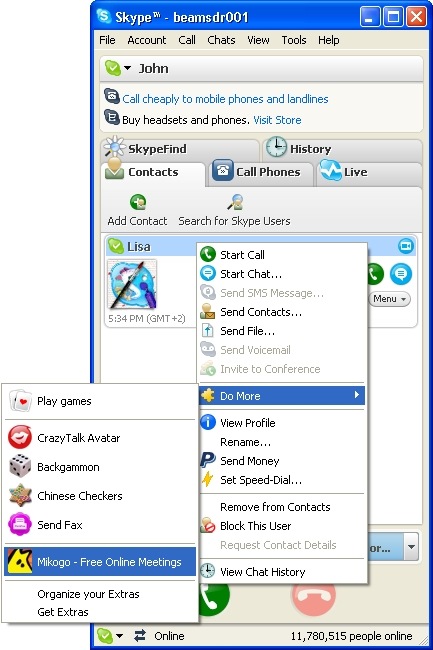
Img Credit: Mikogo
3. In case the person whom you have invited does not have Skype Mikogo Extra, then it needs to be installed before you can start screen sharing. Once the extra is installed on both Skype, then you can start screen sharing by inviting the contact.
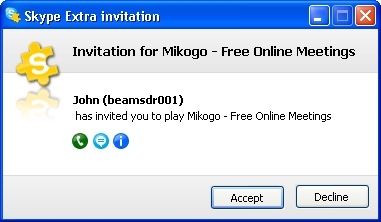
The meeting organizer may invite up to 10 of their Skype contacts to the free screen sharing meeting by inviting contacts separately and repeating the invitation procedure. This Skype Extra can be used for consultations, teaching, IT support, picture sharing, projects, meetings and more. The process is simple and does not require any additional configuration. Mikogo offers high quality screen sharing software with security that is of a high standard, employing an industry-leading 256-AES end-to-end encryption.
Download the Mikogo Skype Extra








Hi Nirmal,
Thanks for the shout out on the Mikogo Skype Extra. Really appreciate you taking the time to review the tool. If you have any questions, feel free to send me an email.
Cheers,
Andrew
The Mikogo Team
Another screen sharing and web conferencing program that you should check out is RHUB Web Conferencing (http://rhubcom.com/v4/web_conferencing/home.html). It is perfect for larger businesses who have web conferencing needs.