

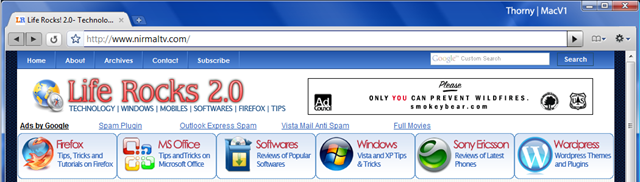
Google Chrome has already made an impression on the web and lots of discussions, tips, tricks and hacks on Chrome. There is already lots of themes being created for Chrome and here is one which gives Mac looks for Google Chrome. The Mac theme gives a silver color finish and also the buttons have a Mac look and feel. But unlike Mac theme for Firefox, there is less for customization in Chrome.
How to Install this Theme:
1. Download the Theme.
2. Extract the files to the following folder depending on whether you use Vista or XP. And backup your existing, default.DLL file
Vista – C:\Users\USERNAME\AppData\Local\Google\Chrome\Application\0.2.149.27\Themes
XP – C:\Documents and Settings\USERNAME\LocalSettings\AppData\Google\Chrome\Application\0.2.149.27\Themes
4. Copy over Default.DLL from your extracted files into your Themes folder
5. Open up Chrome and you have a new theme installed.
Here is a closer look of Mac theme for Chrome.
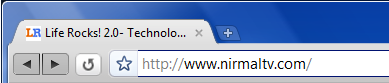
Download Mac Theme for Chrome [ Via WWWBlog





Too bad they don’t have a MAC version of Chrome.
I have listed a few good Google chrome themes in my blog.I like Google Chrome.
http://chromeguru.info
Unofficial Google Chrome Community & Support
First Google Chrome Dedicated Themebase!