

Google’s Chrome browser has many features which are new in web browsers. We have already talked about a feature of opening favorite sites at start up. Another feature worth mentioning is creating application shortcuts. By creating application shortcuts, you can open these web applications as standalone windows. With this feature application shortcuts are created either on desktop or start menu or quick launch and this shortcut opens the web application in an independent window.
To create an application shortcut, open the web page for which you want to create shortcut. Once the page is loaded, click on the page control options button next to settings.
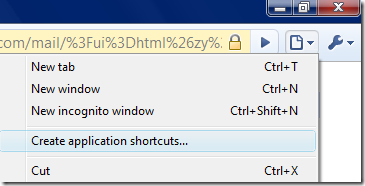
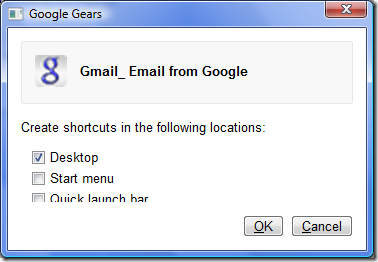
In the settings, select Create application shortcuts item and this will open a pop up asking where to create shortcuts. For example, if you are creating a shortcut for Gmail, then the window displays information that shortcut is created for Gmail. You have the option to create shortcuts on desktop, start menu and Quick launch bar. Once you click OK, application shortcut for Gmail will be created in the locations selected.
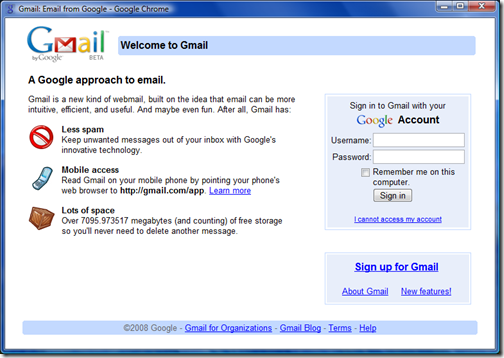
Next time you want to access Gmail, double click on the shortcut and Chrome opens Gmail as a standalone window, similar to a desktop application without any tabs or settings. This is nice feature to have and it does not give the impression that you are checking mail through browser.
This is one feature of Chrome which is worth trying. We experienced that Gmail was a bit fast on Google Chrome when compared to Firefox and it was true even for Google apps account.
Have you tried Google Chrome? What are your first impressions? Do share it in comments.




G Chrome only came out today! hehe and you got this allready? crazy and well done
So far so good. A little annoyed that there is not google toolbar (that is where most of my IE bookmarks are stored) and have found that not all functions work yet but think I will like this.
Wow thats cool
Nice tip
Love the way that it displays separate web application just like another desktop application. Cool!
Application shortcut in chrome is not working for me .. I am using windows XP SP2.
Any Idea???
This is a very good browser as it makes cache of all sites better than others can mak the loading of sites is quite faster than others.
ORKUT is quite fat to open on this as compared to firefox and opera i also tried safari but that is the slowest ever browser i have used.
Application shortcut in chrome is not working for me .. I am using windows XP SP2.
WOW! This is awesome!! I must try this! 🙂 Thank you!
You haven’t explained about ‘Start menu’ and ‘Quick launch bar’
Would you pl!