

Update Star is a freeware which will help you to keep all your software installations on your computer up to date. UpdateStar covers all of your freeware, shareware, demos, commercial software, and includes special offers. As of today Update star has features 95,000 recognized programs and 913,000 known versions.
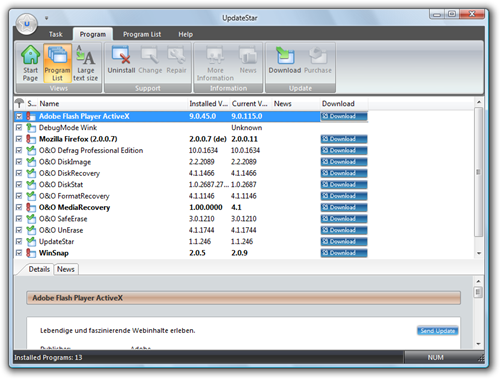
Update Star is freeware worth trying if you have good number of softwares installed on your PC and most of the time there could be new releases to it. Update star will take care of these new releases.
Features of Update Star;
- UpdateStar offers you a time-saving, one-stop information place for your software setup and makes your computer experience more productive.
- Protects against old softwares which can cause crashes
- UpdateStar acts as your replacement for the well known “Add or Remove Programs” within your Windows Control Panel.
- You can easily Import and export complete software setups
- It gets you optimal pricing for sharewares with its tieups.








Seems good software. My PC just got infected by virus. This virus turn on the my automatic update. So, whenever I turned off my computer, it always updating the softwares. I couldn’t turn off the automatic update as my administrator access is blocked seems by the virus too. I’ll install this software once I complete my OS re-installing. Thanks!
I’ve been using SUMo, which stands for Software Update Monitor. It is from KC Softwares at http://www.kcsoftwares.com/index.php?sumo. However, this one looks better and has more features. SUMo doesn’t provide a link to the software company’s website, so you have to search it yourslef.
@Nicky: The UpdateStar website also additionally offers to import complete recommended freeware setups, e.g to set up a new PC.
Simple to import and you can choose which software you wish to install. For example the “Security Starter Pack” for Windows:
http://client.updatestar.com/en/packs
No more searching for the programs and they are always offered in the latest version. I think it helps quite a lot.