

If you have sensitive files in your PC, then its always better to encrypt them and protect using password. Androsa File Protector is a good freeware application to password protect your files with upto 256-bit AES encryption. File Protector allows to put to the sure sensitive file or personal file that do not have to be used/viewed from people not authorized that they have logging to the PC and/or to the files. The usage of this freeware is also very simple, either drag and drop or select files from your PC and add it to the protector Window.
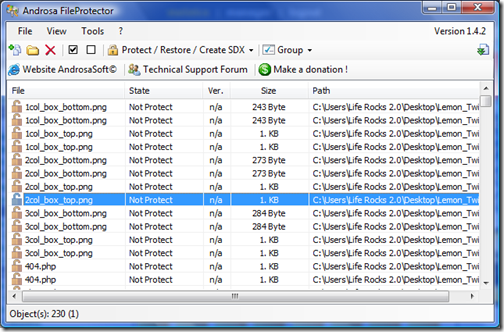
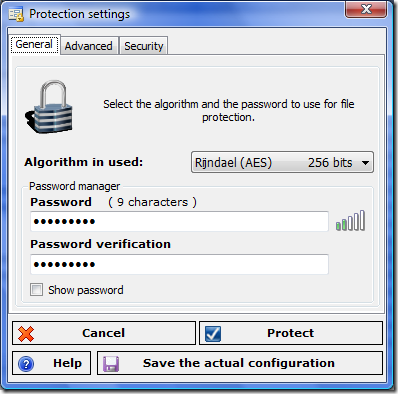
Select the files in the Window and assign a password and other settings. You can also specify the encryption, the freeware supports from 64 bit to 256 bit. File Protector can compress files as it encrypts them and create self extracting archives. There is also option to scramble file name for added security.
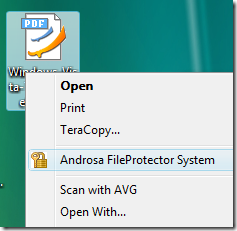
Another good feature of File Protect is it adds a content menu in Windows, so you dont need to open the application to protect files. All you need is to right click and select the option “Androsa FileProtector System”.
Features of File Protector;
- Creating of self-decrypt archive
- Available the Portable version for PenDrive USB
- Possibility to protect any type of file
- Compression of the files before protection, this reduce the size of files
- Integration with the context-menù of Windows
- Cryptography with password up to 256 bit (32 characters)
- Scramble name system
- High safety of the protected files
File Protector is a great utility to protect files especially for the fact that its completely freeware and there is also a portable version for USB flash drives.








this utility software seems to good but recent studies say that even encrypting files can’t secure your data
I used to protect my private files by activate password request which provided by microsoft default system. But I’ll try this software. Thanks for the information.