

In Window, you can hide all control panel items and folders except the ones specified using settings. This is helpful when your PC is shared and you do not want users to make too many changes. With this settings, only those items are displayed in the Control panel which are specified. To make the change, you need to open Group Policy Editor. (Group Policy Editor is not available in Vista Home Basic/Premium users)
1. Open Group Policy Editor, Start-> Run –> gpedit.msc
2. In the Group Policy Editor, navigate to the option User Configuration-> Administrative Templates-> Control Panel.
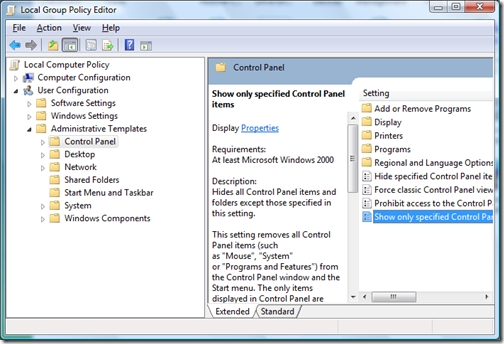
3. In the right window, double click on the item “Show only specified Control Panel Items”. Enable the option using the radio button.
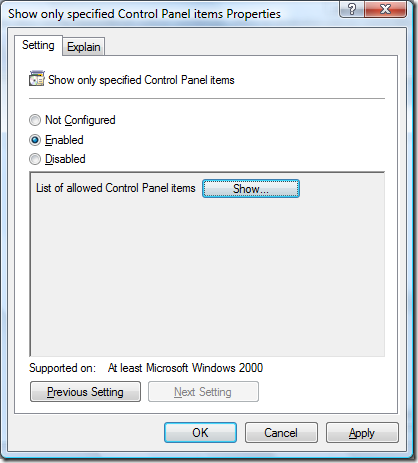
4. Click the Show button to select the items to be shown in Control Panel.
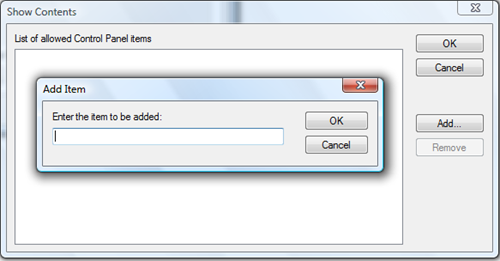
Enter the item to be displayed using the name as its displayed in Control Panel. Once you have selected the items to be displayed, click OK and close the settings. Now if you open the control panel, you will be able to see only the items you specified.
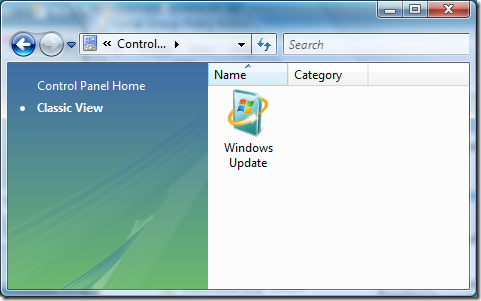
Here I have selected only Windows Update in Control panel. With this policy, you can restrict the items displayed in Control panel.



Definitely a useful trick if you have more than one user using the PC. Stumbled :D.
@Keith,
Thanks for the Stumble.
Doesn’t work in XP/Vista Home 😉 – Group Policys are only in Pro-Versions.
@caschy,
You are right, its does not work with home versions and I have mentioned in the post.
So, you might be using Vista Biz or Ulti edition.
@Myo Kyaw Htun,
Well I’m on dual boot Vista (Home Premium and Ultimate). 🙂
Hi,
I recently bought a couple of vista computers to add them to my domain. I just added one to test the group policy. I have tried everything possible to hide something from the Control panel. I follow your steps one by one…but nothing happens. What could be the prob…cause is very FRUSTRATING.