

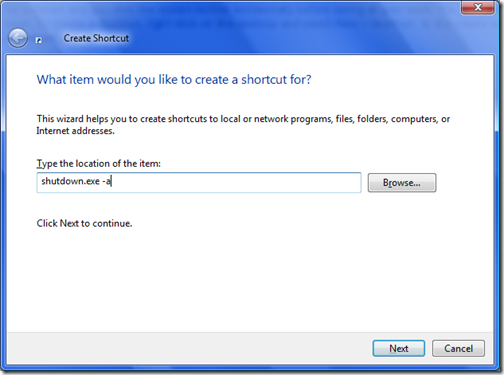
Many times after a software installation, Windows prompt for a restart and you click the restart button accidentally before saving all your work. You can create a shortcut to abort the restart/shutdown process in such cases. To create a shortcut, right click on the desktop and select New-> Shortcut. In the create new shortcut dialog box, first enter the location of shortcut as shutdown.exe –a.
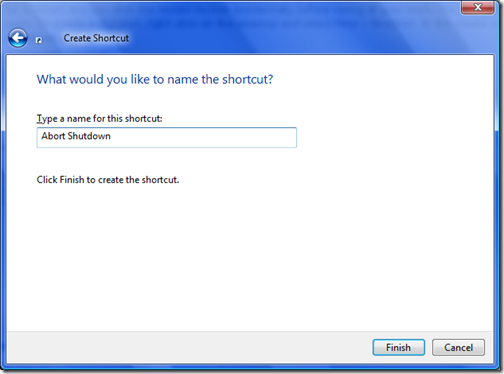
In the next step, give a name for the shortcut like Abort Shutdown.
Click Finish and your new shortcut to abort shutdown or restart will be available on desktop. This shortcut will work only for a short duration between the actual shutdown. So its better to create a keyboard shortcut for this.
Right click on the desktop shortcut and select properties. In the shortcut tab, select a suitable keyboard shortcut, which you can fire quickly.
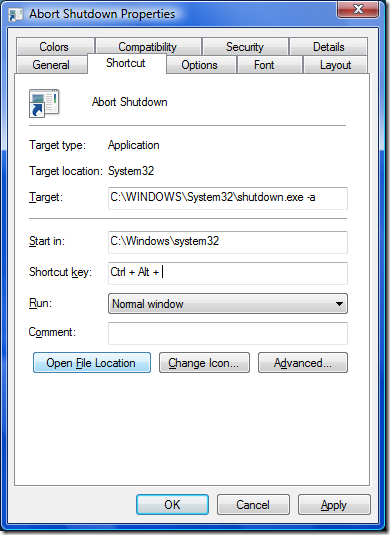
Click Apply and you are done. Next time you accidentally click restart, then quickly fire this keyboard shortcut to abort shutdown process.




Great tip Nirmal,Thanks for sharing
Thats funny, I might have come across such situations once or twice in a year but I hate wasting one sq inch in my desktop for that icon… I am more concerned about the desktop real estate cost. 😉 Anyway, nice tip…
I have been using this command, as i tend to end some system process sometimes which initiates shutdown counter of one minute. 😀
I think you should also mention the other related commands for shutdown
Nice Trick Thanks for Sharing.
Hey Nirmal Any IDea how to disable Quick Play buttons in Vista
This has been a real life saver for me many times :), specially for those stupid Windows updates
This seems to be working with XP too..
This seems to be working for XP too…
Great! I’ll try this useful tip to my XP.
Thanks for the tip! I just had Windows Vista restart on me without asking permission and without giving me the option to cancel. It closed all of my open programs, some of which had unsaved changes that were lost! This will hopefully give me a tool to fight this if it ever happens again. I am still in shock that this could ever happen, and by design!
Thanks a lot, I have some XP issues that create some (unnecessary) shutdowns at times. I can hit that icon–I use the green “play” symbol– in less than a second. A lot of practice, I guess… ;-(
That’s amazing, this is exactly, literally EXACTLY, what I did before getting frustrated at the “.exe -a” and looked this up. I made a new shortcut, typed shutdown -a (as in abort), named it “Abort Shutdown” and chose a stylized Cancel sign to help convey the purpose. After that, I literally chose Ctrl+Alt+A as my shortcut. It’s like looking at what I just did… as if I’m being spied on…no, wait, you didn’t choose an icon…never mind