

If your PC is being used by multiple people with the same login, then mostly its preferred that others do not see your recent documents and also its useful if you were able to control the number of items in the Recent Items (Recent Documents in XP) list. A simple registry hack will help you to take control of the recent document list and manipulate the number of documents shown here.
NB: Please take a back up of your registry before doing any changes.
1. Select Start->Run (Win + R) and type regedit.
2. Navigate to HKEY_CURRENT_USER\Software\Microsoft\Windows\CurrentVersion\Policies. If this folder does not have an subkey Explorer, then right click and select New-> Key.
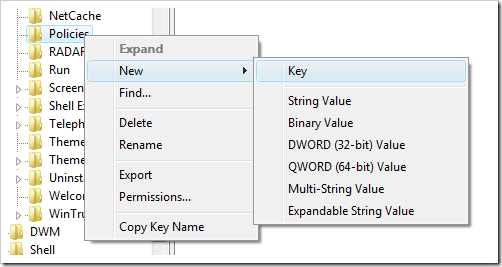
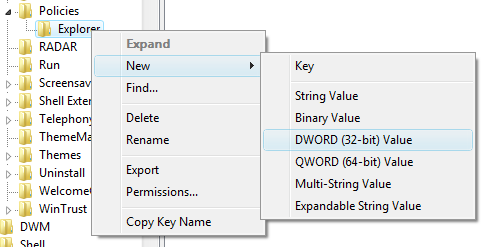
3. Once you have created the subkey explorer, select Explorer and create a New DWORD(32 bit) value.
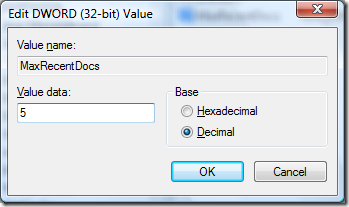
4. Enter the name for this value as MaxRecentDocs.
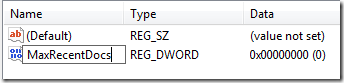
5. Now double click on the created entry and here you can enter the value. Select Decimal and enter the desired number and click OK.
Restart your PC to implement the changes.




Great Tips, Thanks 🙂