

Many time we come across documents or website which are not in English and hence we need to translate them to read it. Office 2007 has a built in translator which can convert text or sentences for most of the popular languages. This feature is available for Excel, OneNote, Outlook, PowerPoint, Publisher, Visio and Word. To translate text using Word 2007, select the Review tab in the ribbon.
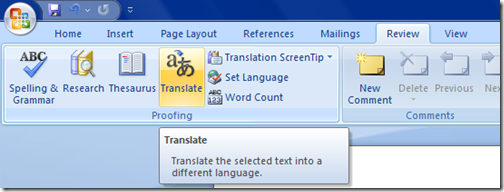
Select Translate option here and you can see a sidebar coming for this option. Here you can select the language for translation.
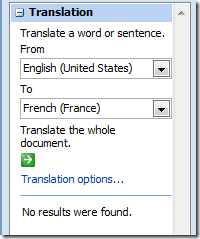
Once you have selected the from and to languages, then click the green button at the bottom and Word will start processing it. In case no language packs are installed, it translates using the online tool and results are displayed in IE within the website WorldLingo.






Been using this already…
you might be interested in
http://www.quickonlinetips.com/archives/2008/06/2008/04/enhance-your-word-2007-experience/
Is the result good and easy to understand? Most translator software I know do not give good result.
The results are not that good.