

Firefox 3 has the new way of tracking URLs visited from Firefox with its Smart Location Bar. In case you made a typo while entering the URL, the Smart Location Bar will still remember the URL and show it when you type something related to this. This could be annoying many times, if the typo is of one or 2 letters. You can always delete a URL from the Smart Location Bar with this simple step.
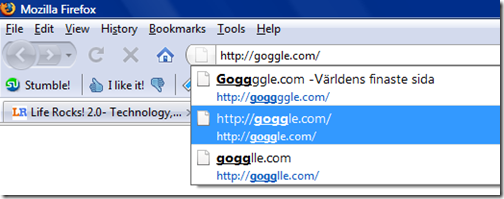
Next time you encounter a wrongly typed URL in the Firefox location bar and you want to remove it from the location bar, then highlight the URL using mouse and press DEL (SHIFT+DEL also works) button on your keyboard and that it, the URL will be deleted.
NB: This tip works with Firefox 2 as well.



Nice tip Nirmal. I recently started using FF3. Every time i log into gmail , i select the option “Remember me”. But every time it asks me to enter the password again. The same happens with all the websites. Do i need to change any setting ?
Great find nirmal, i didn’t knew that.
Thants a good tip, it works. That awesome bar is an annoying feature for me.
I didn’t know SHIFT+DEL also works…What is the different with DEL only?
This don’t work for me what gives? In fact, no combination of del plus anything that I can think of works. How annoying!
Thanks for the tip. I actually tried hitting DEL before, may be I didn’t highlight the url earlier.
Great tip, but unfortunately I’ve noticed that ones I have bookmarked just keep coming back. Arrrg… a little glitchy, but still good.
This also works on form fields. I mistyped a login name on a page once and Firefox kept track of it. Highlight, press DEL or Shift-DEL and it’s gone.
This is only a temporary fix because when you re-open the browser the deleted url is still there.
MJ said: This is only a temporary fix because when you re-open the browser the deleted url is still there.
This is exactly my experience as well. It’s gone until then next time I restart the browser, then it’s back again. Annoying as hell.
This is what I did:
1. Make the autocomplete menu show only typed addresses and not visited or bookmarked
* Enter about:config in the location bar to access the advanced preferences. Accept the “This may void your warranty message”.
* Look for browser.urlbar.matchOnlyTyped and double click it to set it to TRUE.
2. Change the number of suggestions displayed in the autocomplete menu
* Enter about:config in the location bar to access the advanced preferences.
* Look for browser.urlbar.maxRichResults and set it to the number of results you want to get.
* Restart Firefox for the change to take effect.
yep, indeed, if the url to be deleted is a bookmarked one,
then it cannot be deleted,
so, you should first delete the entry from the bookmarks,
and then the typed url 😉
Thanks for the article. Regarding firefox though, this is what I mean by “Implement the Basics First” when it comes to UI design. There is no right-click context menu for this same keyboard DEL key action. Windoze 95 started doing that almost 15 years ago so the familiarity has been around for awhile. Basic UI design: map keyboard actions, right click context menus, and TAB stops properly as related. Should be able to right click on the url bar dropdown list and have a “delete this” available.
THIS DOES NOT WORK x(