
Windows Vista Explorer Groups and Stack Feature

Advertisements

Windows Vista features lot of UI changes when compared to previous Windows versions. Apart from the visual changes, there are many hidden features in these UI. One such feature is the groups and stacks in Windows Explorer. The Vista Explorer has few headings on the top of folders. These are basically Name, Type, Date Modified, Size and Tags.

tmpC90C

Click on the menu at the end of the Type and you can see sub menu. When you click group, files are grouped based on Type. At the same time, if you select group from Name menu, then files are grouped based on name.
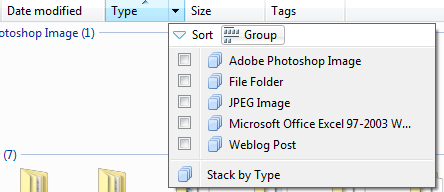
image

Another feature in Vista is Stack. When you do a Stack by type, then files are ordered based on file type. Double clicking on the stack will open up all of the corresponding files.
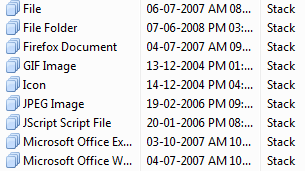
tmpDAAA

To conclude, the new file management system is Vista is very much improved when compared to XP and its not just the basic ordering what you find in Vista.


Tags: , ,
 

Share this Post

stumbleupon-48�48.png digg-48�48.png technorati-48�48.png feeds-48�48.png delicious-48�48.png


Add a comment

Translate Page

Translate to EnglishÜbersetzen Sie zum Deutsch/GermanПереведите к русскому/RussianΜεταφράστε στα ελληνικά/GreekVertaal aan het Nederlands/Dutchترجمة الى العربية/Arabic中文翻译/Chinese Traditional
中文翻译/Chinese Simplified한국어에게 번역하십시오/Korean日本語に翻訳しなさい /JapaneseTraduza ao Português/PortugueseTraduca ad Italiano/ItalianTraduisez au Français/FrenchTraduzca al Español/Spanish
Nirmal is a Software Engineer and Technology Blogger. He is a Microsoft Most Valuable Professional in Windows Desktop Experience.
mvp   India Technology Bloggers  

More Articles

Sony Ericsson Phone releases and reviews
Top Tutorials
Freeware for Windows XP/Vista
Personal Blog
India Blog
The Mobile Blog
