

If you ever wanted to have a flash content for your blog header, then here is the simplest way to create a flash based image rotator. The flash content can be created using your own images. JW Image Rotator, built with Adobe’s Flash, enables you to show photos in sequence, with fluid transitions between them. It supports rotation of an RSS, XSPF or ASX playlist with JPG, GIF and PNG images.
How to create Flash Content:
1. Download the JW Image Rotator. Unzip the files and you can see an .xml file inside the folder along with swfobject.js and imagerotator.swf files.
2. Open the .xml file in textpad. You can see different tracks in this file. Each track has title, creator and the image location. These tracks represent the number of images rotated. Here the image shows 3 tracks and you can also add more tracks.
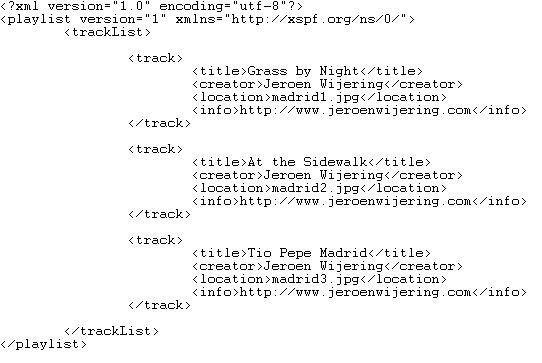
3. Now give the tracks a name, creator and the correct location of images. I suggest you to have it in same folder as the xml file. Somtimes you will need to give the complete path in your host server.
4, Once you are added the image locations, save the xml file by giving a suitable name. Copy all the images to the same folder as the xml.
5.Now upload the complete files, including xml, images, imagerotator.swf, swfobject.js into your server. Its better to create a separate folder inside your theme.
6. Create a page or post where you want to add the content and paste this code.
<embed
src=”imagerotator.swf”
width=”300″
height=”300″
allowscriptaccess=”always”
allowfullscreen=”true”
flashvars=”file=playlist.xml&backcolor=0x000000&autostart=true” />
The src is important and this is the path where you have uploaded all the files and playlist.xml indicates the xml file which we had created earlier. You can also set the height and width of the flash content. Important thing to note is that do not use the WYSIWYG editor.
7. Publish the page and now you can see images rotating. The transition effects between images are by selected automatically.
Thanks to Ram for helping me out to prepare a flash content.




Cool trick, definitely useful if you want to rotate ad banners for multiple clients.
Cool post, Nirmal. This is great.
Jeroen Wijering is a great developer.
I’ve used his mp3 player on my site.
He has got many other tools too. Have a look:
http://www.jeroenwijering.com/
nice one
bookmarked and stumbled, will come in handy someday
Looks good … I should think something to implement in my next theme. however, I wish flash player comes embedded with browser setup by default. I hope implementing it is as simple as you explained here 😀
@Alfred,
Thanks for the Stumble.
@Kanak,
The implementation is also simple.
I think using a JS module for this is a better idea. Flash requires a plugin. Also, the flash method is obtrusive. JS solutions can be made unobtrusive.
By the way, I am a bit biased about flash – I am a JS developer by trade – and hating flash is a job requirement 😉
Thanks for the mention. This is great player.