

While using the Internet, you found some cool website, but forgot to bookmark it or save the link. You can search for any previously visited website more efficiently using the Opera History Search. Opera offers you the option of searching previously visited websites using keywords. If you can remember any keyword associated with the website, then Opera can find it out for you.
To search previously visited sites, type ‘Opera:historysearch’ in the browser’s address bar. A search window appears which is similar to Google search. Enter the keyword and press History Search.
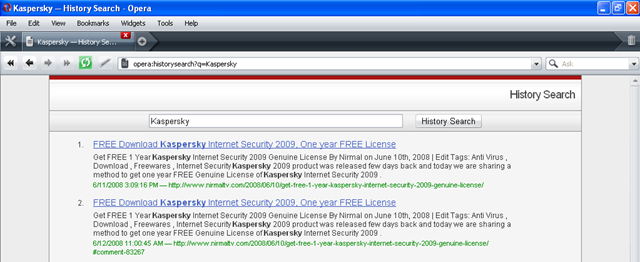
Opera lists all pages which has the keyword and previously visited by you. Just like any other web pages, you can bookmark searched pages.
If history is cleared, then this search will not work.








Hey this seems to be a pretty good options .. I normally used to have trouble finding the site which I once visited via google etc …
Another way is to Press Ctrl+Shift+H (Or click Tools–>History). Orcourse the quickest way is to just type the keyword in the address bar, the dropdown box would show revlavent results.