

When you download videos from sites like YouTube, the format will be .flv which cannot be played in Windows media player. Freez Converter is a free tool to convert Flash FLV video files to AVI, MPEG, WMV video files so that they can be played in Windows Media Player or edited by video editing software. With this freeware, you can set output video’s bitrate, framerate, output audio’s bitrate. It can also convert batches of Flv files to AVI/MPEG/WMV files with high speed.
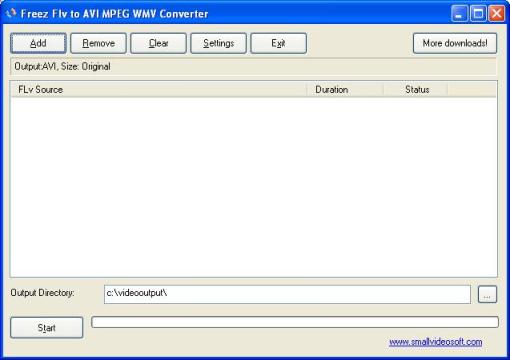
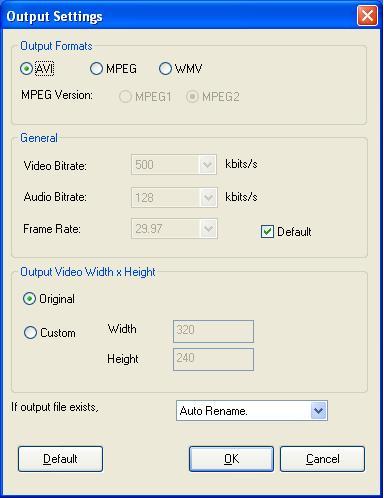
The software has options to select the video birate and also the output video size.
Freez Converter is free to download and use.








Thanks for help me because i search for a long time this software. So thank you very much.
very good product
very good product.
Thanks for help me because i search for a long time this software. So thank you very much.
Excellent product. Simply the best. Thanks.
NO good
They say free it is not free they ask you to register right away on first use
Excellent product. Simply the best. Thanks.
This i misleadng. I downloaded the product, installed it and then theywanted me to register and pay.
Also, I tried to use it, with the watermark that they said it would have, and the sound was really bad.
it is a good software Excellent product. Simply the best. Thanks.
what a waste of time – they fool you into thinking its “freeware”, then you cant run it until you register. Once you register, you get a message saying “we dont offer the free version because they’ve had too many requests” – free is free – ripoff merchants!
@Bob,
You are mistaken, this is totally freeware and it does not ask any registration or purchasing. I have just installed it again to check.
@Bob,
If you are still saying its not a freeware, pls upload an image showing the product where its asking you to buy and I’ll investigate
This is not a freeware, I just tried and even before 1st use its asking for registration and to buy.
useless link !!!!!
Not free. need to pay if wanted to use.
fantastic, keep up the good work!
Don’t say is FREE ’cause is not, say it will have a watermark and need to be register right away
that way nobody will waste the time to download it… CRAP!
First of all, let me say this installed very quickly and easily and NEVER asked me for any registration, or even for my email or any other details! Whoever is saying you need to register is spreading misinformation.
It has a very simple interface and I was able to use it straight away. Click Add to select the flv file you want to convert, (optionally) click settings to say which format you want as output and set the bitrate and frame dimensions if desired, and then click Start and away it goes. I converted a 3 minute video to these various formats in about 15 seconds so it was quite fast.
I was able to convert to all of the formats (avi, mpg, or wmv) and it worked without a hitch, with the exception of MPEG2, however MPEG1 worked fine.
Very highly recommended.
For the above comment can you just use my first name and leave out the last name? Thanks.
After seeing Julio’s post I thought I’d try again. I don’t know what program Julio is running but it is NOT Freez FLV to AVI. It still says you have to register the product to run it. After you register, it says they are no longer registering the free product and you must buy it. If you don’t try to register and click the “later” button, it closes the program.
Same s*** it has done for years. Total waste of time.
(Julio probably works for Small Videosoft)
than;s man
thx a lot now i can watch youtube videos on my dvd player.thx again
hi i am free download this software
i would like to use this converter
dear Sir, I am download several clips from youtube but it is unable to play my vcd player, please help me in this even i downloded several file converters but no use please hepl me