

If you are connected to a network and you have shared some folder, then it is visible to all the users in the network. But you can make the shared folders invisible. Here is a simple trick to make shared folders invisible so that only known users can access the folder.
1. Navigate to the folder which is shared across the network. Right click on the folder and select Rename.
2. Add a ‘$‘ to the end of the folder name (without the single quotes). For example if the folder name is Blogging, rename it to Blogging$.
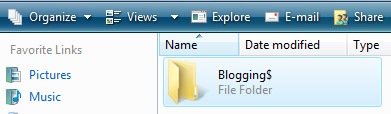
3. Now you can share the folder and people who know about the folder can use it.




This is a really cool tip, never heard of it before and its highly useful
This is a really cool tip, never heard of it before and its useless for me!
i agree this tip is very helpfull for me.. thanks 😛
hehehe … we used to use this trick in college to hide the movies folder. Mostly like system drives are with default share with $ suffix ( like c$ , D$ etc). however, if you use network scanner tools like netscan, you can see all the shared folders , even the one with $.
THis will be useful for me in College Hostel.
Nice tip there …never knew it.
well i knew about this dollar sign things is there any trick you can suggest because it is not that much effective,.,
thanks
more power,,,
PURUNTONG
I am really loving the theme/design of your web site. Do you ever run into any web browser compatibility problems?
A small number of my blog audience have complained about my site not
working correctly in Explorer but looks great in Opera. Do you
have any ideas to help fix this problem?