

If you have the habit of commenting on blogs you read, then the most annoying part is filling the name, email and website link on each blog. Some blogs does remember these details, but its difficult to add the details each time you visit the blog. But now you can automate the commenting section of blogs with two tools which will save time and also help you fill more comments.
1. Texter: Texter is a small software for Windows from Life Hacker. Download and install the software and run it. Add a host string using the + symbol. Enter a value to the host string, this value would be the one used to fill comment. Now select type as script and enter you details as follows.
Your Name{Tab}Your Email{Tab}Website url{Tab}
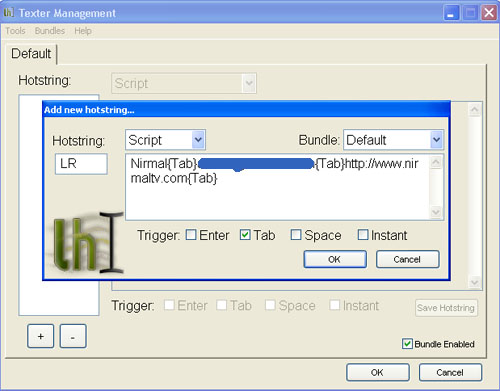
Now select trigger mechanism, I have selected Tab and Click OK. Now go to any blog and write the host string into the Name textbox and trigger it using the selected trigger (tab in this case). You can see comments automatically filled in all the textboxes. You can even fill comments if you add another parameter after website url.
2. Greasemonkey script: This will work only if you are using Firefox. You need to install the Greasemonkey add-on. Then install the user script for filling comments. Once installed click ALT+C and then enter the details, name, email ID and website url.
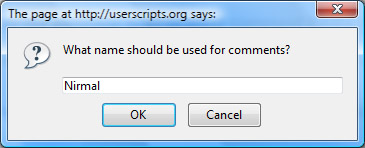
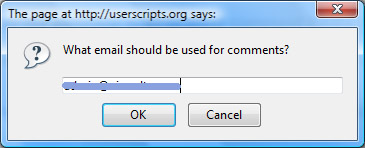
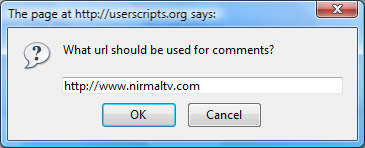
Now go to any blog and click ALT+C and the commenting form will be filled automatically. These tools are made mainly for WordPress blogs, but you can use it other blogs which have the same format.






Yups this is quite cool I definitely like the second greasemonkey script its quite easy to set up and use.
Ha, useful tools, and u can try roboform as me, convinent as well!
I use Roboform. It’s available in both paid and free flavors. I was so impressed by Roboform, that I purchased a paid version! Check it out Nirmal.
@Franca Richard and Thilak,
I’ll try out Roboform.
Useful one..But both in IE and Firefox most of the forms are temporarily stored for like comment box. So I just type for the first time and then whenever I visit that site again or any other site, so I just type the first character and they are there! So I didnt feel the necessity of this,,,
@Joel,
I too was using the same method you specified, but believe me this one saves lots of time, just one click.
Yeah, this is cool, Usually i am a very lazy person in commenting. 😆 . I hope using this would make me comment more often.
I like the Greasemonkey script Nirmal. I will try it out.. I have been using the InformEnter Firefox extension which lets you create various profiles. I use one for Shankri-la, my wife uses one for Spicytasty & we use a profile for home address while filling out forms. 😛
I’d been using the Firefox extension, but I’ll probably switch to Texter (I can see many other uses for it, some dough for future how-to posts 😉 )
I Like Texter. It will save my time.
Grease monkey script looks very cool. I have filled info using it in this comment 🙂
Bonjour, je suis americain et comprend pas tut but votre blog aide moi beaucoup. Merci beaucoup.
that`s great…commenting on blogs I read is little time consuming when it comes to form fillings…nice article…