

Ever wanted to have more than one versions of IE in your PC? If yes, Multiple IE is the solution to this. Generally IE does not allow you to keep previous versions or run 2 different versions on same PC. In case you want to check the alignment issues or page rendering of your blog or website in IE, then Multiple IE is a good software (freeware) for this purpose.
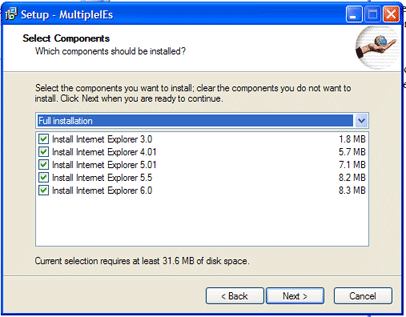
After starting the program, you can decide on which version of IE to install. The older browsers can be called up from the start menu after set up. The installer contains IE3 IE4.01 IE5 IE5.5 and IE6. All you need is to have a system which has XP and IE7. Currently this software is not supported on Vista.
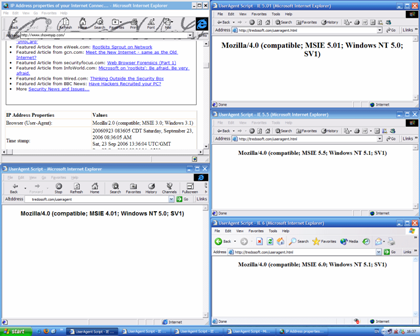
NB: IE5, IE5.5 and IE6 may crash unexpectedly.
Img Src: Tredosoft








What about installing IE 8 Beta?
By the way, if you are on linux, IE4Linux does this too – install multiple version on IE using Wine. Useful for developers.
ew who wants IE anyway 😡
I wonder if tools like this is available for Firefox. 😆
I find it great for troubleshooting IE6 or older bugs while doing web design work. It’s a recent find for me too and have a post about it in draft. 🙂 You beat me to it buddy! 😀
@Binny,
IE8 has just arrived right? Thanks for that update on Linux.
@Rahul,
I knew there would be some IE haters when I wrote this one. 🙂
@Syahid,
Not sure about that.
@K-IntheHouse,
Indeed nice for developers.
Nice tool – will check it out.
I am developing a theme for public release, and IE testing is the last phase for me. It seems well in IE6 – so chances are it will work in IE7 and IE8b, but I wanted to test. This is a better alternative to browsershots.org
Will stumble too.
@Rahul
This is not for normal users – even if you are a IE user, you just need 1 version of IE. This software is for web developers who have to test their scripts in multiple version of IE.
@Sumesh,
In case you are developing a theme, this is th best way you can check alignments.
If want to check your website compatibility on different browsers, browsershots.org is just the right place for you.
@Rakshit,
Browsershots is a good service, but then for developers its not easy to check each and every page in browsershots, in that case this comes handy.
just in time the software i’m looking for. thanks for mention it. i’m wondering how my blog looks like in that damn old ie.
Nirmal! I am speechless but why? Because I think both of us has minds working on the same lines these days. I have created a post today about this same software and I am planing to upload it today. I visited your blog and found that you have covered it as well 🙂 .
Anyway I think that this is very useful indeed and much better than testing through an online service.
Still thinking about the coincidence Ah! 😆
Oh! Syahid A. I forgot to answer your question. Actually it is entirely possible to install any number of versions of Firefox. This is by the use Portable Firefox. In fact any version of the Firefox can be converted in to portable one manualy. I am thinking to write about it (it is not very difficult). But the easiest thing is to download the Portable Firefox version that you want (2.0, 3.0, 1.50 etc.) from the net.
BTW I have Firefox 1.50, 2.0, 3.0 beta’s for know for testing purposes 🙂
Portable FF has some other advantages as well even if you are not using it for the portable purposes (profile independence from windows etc.)
I hope that this answered your question 🙂
@Jawwad,
Strange coincidence indeed. 🙂
This is a pretty good software for developers. Even I have installed multiple versions of Firefox on my Laptop.
That’s an interesting thing to be able to do – I recently tried IE8 Beta and soon uninstalled as it keep crashing on me and meant I couldn’t use IE7 anymore.
This would have been a good solution, I’ll maybe give this a try in future, thanks!
wow multiple IE is what i was looking for to test my wordpres theme on different versions of IE can’t we have some browser tester which can test website on all types of browsers ??
I installed IE 6 and IE 8 but when accessed IE 6 there appears no cursor point on fields. Also IE 6 crashes each time i click on some feature. Please suggest if there is any solution regarding this.
I got the same problem as BlogsDNA. Any suggestions?
Hi. I got the same problem (In IE6 there’s nocursor points on fields). Maybe it could be because I have installed IE8. Is there a incompatibility?
Excellent tip for any web developer like me. Was wondering if theres any such possibility. So now on i needn’t look in to 2 machines simultaneously. Will try. Thanks a lot.
Thanks for the guide but I am looking for the ways to install ie7, ie8 and ie9? is there any way to achieve this